Exercise 9 — Structured Planning
Code-Along Part 2 · 15 minutes
Persona: Riley — SRE lead
Working project for all six exercises: part2/lab/
Files to edit:
src/main/java/com/incidentmanagement/agentic/agents/PlanGenerationAgent.java
One application for Part 2
Part 2 is six short exercises: 9 Planning (15 min), 10 MCP evidence (10 min), 11 Memory (10 min), 12 Voting (15 min), 13 Events (10 min), and 14 Persistent outcomes/replay (15 min). That is 75 minutes of labs, leaving 15 minutes for introduction, transitions, and troubleshooting in a 90-minute event slot.
Start Quarkus once, keep this folder and terminal for the entire part, and save edits to trigger hot reload on the next request. Use the Workflow dropdown at the top of the dashboard to select the workflow named in each exercise. Do not reset files, replace projects, switch Git branches, or restart dev mode between exercises. PostgreSQL and Kafka start up front; the MCP fixture server is bundled in the same application. The dev schema uses update, and the idempotent startup seed preserves existing records across hot reload.
Choose part2/lab/ for code-along, or part2/solution/ for a completed run-and-read route. Stay with that choice for all six exercises. Optional challenges and test-suite runs are outside the core timebox; preflight dependency and container downloads before the event.
The dashboard’s Workflow selector chooses what your next submission does: Generate recommendation, Send message, Run vote, or Submit event. Switching workflows preserves your earlier work and does not run a request; keep Planning / MCP (Ex9–10) selected for this exercise.
Enterprise context and goal
Riley needs different specialist work for different incidents, with an inspectable plan and a bounded review loop. Build Plan → Execute → Review using the incident facts already provided. Deployment evidence is explicitly not fetched yet; connecting it is Exercise 10.
Specialists recommend actions and production checks; they do not execute changes or observe recovery. An accepted recommendation becomes RECOMMENDATION_READY, while an unfinished run after three iterations becomes NEEDS_OPERATOR_REVIEW. The incident stays In Progress.
%%{init: {'look':'handDrawn','theme':'base','themeVariables': {'darkMode':false,'background':'#FFFCF5','primaryTextColor':'#1F1F1F','secondaryTextColor':'#1F1F1F','tertiaryTextColor':'#1F1F1F','textColor':'#1F1F1F','lineColor':'#4A4035','edgeLabelBackground':'#FFFCF5','clusterBkg':'#F5F5F0','clusterBorder':'#6B5B45','fontSize':'16px'},'flowchart': {'nodeSpacing':35,'rankSpacing':55,'padding':18}}}%%
flowchart TD
    FACTS(["Incident facts"])
    PLAN(["Structured specialist plan"])
    CHECK["Java prerequisite validation"]
    EXEC(["Specialist recommendations"])
    REVIEW{"Recommendation ready?"}
    DONE(["Operator verification<br/>still required"])
    FACTS --> PLAN --> CHECK --> EXEC --> REVIEW
    REVIEW -->|"Feedback, at most 3 iterations"| PLAN
    REVIEW -->|Yes| DONE
    style FACTS fill:#D4E6F1,stroke:#2E6B8A,color:#1F1F1F,stroke-width:2px
    style PLAN fill:#D4E6F1,stroke:#2E6B8A,color:#1F1F1F,stroke-width:2px
    style CHECK fill:#FFF8DC,stroke:#C4A000,color:#1F1F1F,stroke-width:2px
    style EXEC fill:#D8F0D8,stroke:#3D7A3D,color:#1F1F1F,stroke-width:2px
    style REVIEW fill:#FFE4CC,stroke:#B87333,color:#1F1F1F,stroke-width:2px
    style DONE fill:#E8DCC4,stroke:#6B5B45,color:#1F1F1F,stroke-width:2px
Step 1 — Start once (2 min)
From the repository root:
Open the dashboard. At the top of the page, open the Workflow dropdown and choose Planning / MCP (Ex9–10). Leave this terminal running through Exercise 14. In the completed solution, the MCP lookup is already wired; inspect that code now and follow its behavior in Exercise 10.
Step 2 — Read the plan contract (3 min)
The supplied models define a record ExecutionPlan(List<ResolutionStep> steps, String rationale) and four steps: DIAGNOSE, MITIGATE, VERIFY, COMMUNICATE. The supplied executor checks prerequisite ordering before running any specialist. On a replan, earlier accepted results can satisfy prerequisites.
PlanGenerationAgent is a declarative @Agent(outputKey = "plan"). Its prompt determines the work; Java checks whether the plan can be executed. Structured output alone does not guarantee a valid plan.
Why use this executor instead of @PlannerAgent?
These have different jobs. PlanGenerationAgent is an LLM-powered @Agent that proposes an ExecutionPlan. @PlannerAgent is a workflow annotation that connects sub-agents to a custom Java Planner through @PlannerSupplier. A refactor to that workflow could still use PlanGenerationAgent to generate the plan.
We keep the supplied executor so the 15-minute exercise makes plan generation → Java validation → specialist dispatch → review easy to inspect. You edit one prompt; the executor supplies the policies. The optional architecture comparison explains the alternative without adding work to the core timebox.
Step 3 — Give the planner its rules (5 min)
Replace the short @SystemMessage in PlanGenerationAgent.java with the following. Keep its @Agent and existing @UserMessage, including the evidence and feedback placeholders.
@SystemMessage("""
            You plan IT incident response; you do not execute production changes.
            Available specialist steps:
            DIAGNOSE: identify the likely cause using supplied facts and deployment evidence.
            MITIGATE: recommend a mitigation; requires a diagnosis.
            VERIFY: assess the recommendation and name checks an operator must perform;
                    requires mitigation. Do not claim these checks have actually run.
            COMMUNICATE: write a stakeholder update; include this for P1/P2 incidents.

            Order DIAGNOSE before MITIGATE before VERIFY.
            On replanning, use feedback and prior results; schedule only unfinished work.
            Never invent deployments, metrics, tool results, or completed actions.
            Return the ordered steps and a one-sentence rationale.
            """)
Save. Dev mode picks up the change when you next make a request. All the specialists, validator, and bounded loop are supplied.
Step 4 — Inspect one recommendation (5 min)
-
Open incident #2. Copy the following text into the report field, then click Generate recommendation:
-
Read the Planning result outcome card and iteration count. Expand each round in Review timeline to inspect its selected steps, rationale, and reviewer feedback.
- Expand Specialist recommendations to read the diagnosis, mitigation, verification, and communication. Latest specialist plan shows only the latest round, so a replan may contain just
COMMUNICATEwhile earlier specialist recommendations remain available. - The Deployment evidence card shows Not fetched (
not_requestedin the original saved result). This is an honest baseline, not a fabricated tool result. The planner must work from incident facts alone. - Confirm the incident remains In Progress. A complete recommendation is not production recovery.
The example below uses local fixture data to illustrate a two-round result. Round 1 requests a stakeholder update; Round 2 schedules only COMMUNICATE. Plan accepted means the Java prerequisite check passed; the reviewer can still request another round. The final Recommendation ready card does not mean production recovery has been observed. Your generated text and iteration count may differ.
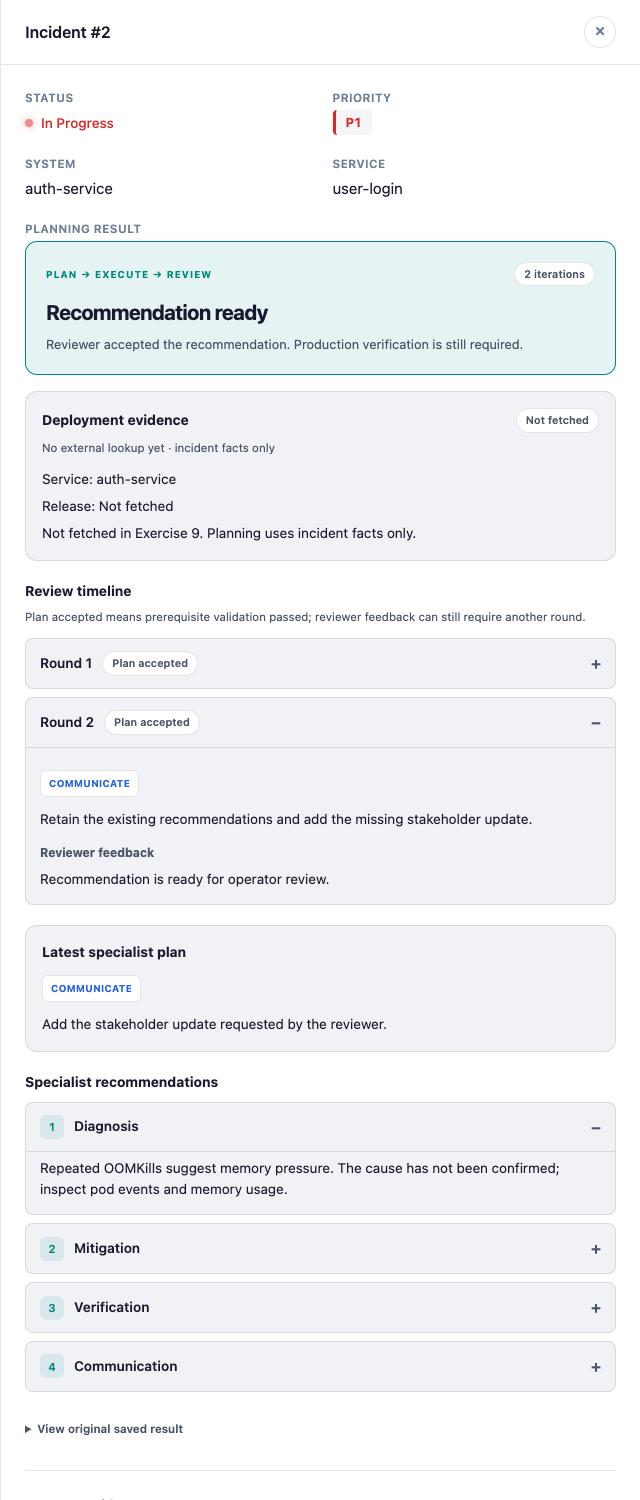
The categorized result is saved with the incident and remains available after reloading the dashboard. Use View original saved result when you need the complete text.
Done when
- You can identify the plan, prerequisite check, specialist results, and review outcome.
- You can explain how feedback and the three-iteration budget bound replanning.
- You can distinguish
PlanGenerationAgentfrom the framework’s@PlannerAgentworkflow annotation. - You distinguish incident facts from evidence that has not been retrieved.
Optional comparison — Custom planner workflow
This is an architectural comparison outside the 15-minute core. Keep the existing application and dev-mode session; no code changes are required. The alternative below is a design outline, not a supplied runnable implementation.
Plan generation and workflow planning are separate responsibilities
PlanGenerationAgent answers “What specialist work should this incident need?” with structured data. The executor answers “Which proposed steps may run, with which inputs, and what happens after review?” A framework Planner can take over that orchestration role. It does not remove the need to generate or validate the incident plan.
| Design question | Current PlanGenerationAgent + executor |
Alternative @PlannerAgent workflow |
|---|---|---|
| Who proposes the specialist steps? | PlanGenerationAgent returns ExecutionPlan. |
Keep PlanGenerationAgent as a sub-agent for the same LLM-generated plan. |
| Where is orchestration defined? | PlanExecuteFlow assembles plan, execute, and review actions in a bounded loop. |
A workflow interface declares sub-agents; @PlannerSupplier supplies the custom Java Planner that chooses the next action. |
| Who enforces prerequisites? | PlanValidator rejects invalid ordering before specialist dispatch. |
Reuse that validation before the custom planner schedules specialists. |
| Who carries results and reviewer feedback? | Explicit scope updates carry specialist results and feedback into replanning. | The custom planner and agent input/output contracts must arrange equivalent scope state. |
| Who bounds replanning? | The supplied loop allows at most three iterations and stops when the recommendation is ready. | Custom orchestration must preserve an equivalent review policy and iteration budget; @PlannerAgent alone does not supply those domain rules. |
| Where does required MCP evidence fit? | Exercise 10 wires the supplied evidence lookup before planning and blocks unusable evidence. | Preserve that gate before the plan-generation sub-agent is scheduled. |
| What does the participant implement? | One agent prompt; the executor is supplied. | Building the alternative also requires a custom Planner, workflow wiring, and behavioral checks. |
| When is it useful? | Teaching structured planning and deterministic checks in a short lab. | Teaching custom framework orchestration or integrating a reusable scheduling policy. |
Where the framework pieces would fit
A refactor would introduce three pieces:
- A workflow interface with a method annotated
@PlannerAgent, namingPlanGenerationAgent, the specialist agents, andResolutionReviewAgentas sub-agents. - A static
@PlannerSuppliermethod in that interface returning a custom JavaPlanner. The planner is orchestration infrastructure; the LLM agents remain plain@Agentinterfaces. - The custom planner's action-selection logic, using the framework's
firstAction(...)/nextAction(...)lifecycle to schedule plan generation, validate the result, dispatch the requested specialists, and schedule review. It would carry forward accepted results, invalidate dependent results when earlier work changes, feed review feedback into another plan, and enforce the three-iteration limit.
The existing REST adapter could then invoke that workflow and retain the dashboard response fields and history. The evidence gate, scope inputs/outputs, and result mapping would need deliberate wiring; placing @PlannerAgent on PlanGenerationAgent would not perform this refactor.
Why this differs from the Ex8 refactor
Ex8 has a fixed pair of steps: draft, critique, then repeat. @LoopAgent directly expresses that shape and its bounded repetition. Ex9 chooses specialist work from an LLM-generated plan and applies domain-specific prerequisite and review policies. @PlannerAgent provides a place to integrate those policies through a custom planner; it does not make the policies disappear.
The choice here is about the learning goal. Keep the current executor when teaching inspectable plans and deterministic validation. Explore the custom planner when teaching how to build a new orchestration pattern. Both approaches should retain the distinction between a ready recommendation and verified production recovery.
Before treating a custom planner as equivalent, verify that invalid plans invoke no specialists, changed diagnoses invalidate dependent results, reviewer feedback drives replanning, and the third failed review returns NEEDS_OPERATOR_REVIEW. After Exercise 10, also verify that unusable required evidence stops the run before plan generation. These behaviors define equivalence more meaningfully than a shorter workflow declaration.
Reference: LangChain4j custom planners and declarative API. The Planner, @PlannerAgent, and @PlannerSupplier roles above also match this workshop's pinned LangChain4j API.
Keep the same application running. Continue to Exercise 10 — Required MCP Evidence; there is no reset or folder change. If stuck, compare only PlanGenerationAgent.java with its counterpart in part2/solution/.