Exercise 8 — Declarative Quality Loop (Bonus)
Code-Along Bonus
Timebox: 15 minutes (self-paced); optional comparison is outside the core timebox.
Persona: Jordan — Java platform engineer
You work in: solutions/08-quarkus-flow/lab/
Files to edit:
src/main/java/com/incidentmanagement/agentic/agents/ReportDrafterAgent.javasrc/main/java/com/incidentmanagement/agentic/agents/ReportCriticAgent.javasrc/main/java/com/incidentmanagement/agentic/workflow/IncidentReportWorkflow.java
Full solution
The completed files are in solutions/08-quarkus-flow/. Compare individual files while keeping the same working project and dev-mode terminal.
Enterprise context and goal
Jordan, Apex Systems' Java platform engineer, needs incident reports that are useful after the incident bridge closes. A first AI-generated draft may omit important details. Jordan wants a consistent review process that passes feedback into the next draft and bounds the work.
Build draft → critique → revise with @LoopAgent. Stop after a complete draft-and-critique iteration when the score reaches 7, or return the last result after three iterations. The dashboard continues to display the report, score, and iteration count through the same Generate Report button and REST endpoint.
The critic uses the incident record as its source of facts. Missing information must be stated explicitly, and proposed follow-up work must remain labeled as recommendations. A passing score supports report preparation; an operator still reviews the content.
Why @LoopAgent?
This workflow has a fixed pair of agents and a clear stopping condition. A declarative interface makes that structure visible:
@LoopAgent(name = "incident-report-quality-loop", outputKey = "reportResult",
        subAgents = {ReportDrafterAgent.class, ReportCriticAgent.class}, maxIterations = 3)
Map<String, Object> generateReport(@MemoryId String reportInvocationId,
        String system, String service, String priority, String description, String status);
Both agent methods are plain @Agent interfaces. The drafter writes report; the critic reads that report and writes a typed ReportCritique under critique. The next draft receives that critique through shared scope. The supplied initialization and output hooks preserve the response fields expected by the dashboard.
The programmatic builder can express the same loop. It is retained as an optional comparison at the end of this guide.
%%{init: {'look':'handDrawn','theme':'base','themeVariables': {'darkMode':false,'background':'#FFFCF5','primaryTextColor':'#1F1F1F','secondaryTextColor':'#1F1F1F','tertiaryTextColor':'#1F1F1F','textColor':'#1F1F1F','lineColor':'#4A4035','edgeLabelBackground':'#FFFCF5','clusterBkg':'#F5F5F0','clusterBorder':'#6B5B45','fontSize':'16px'},'flowchart': {'nodeSpacing':35,'rankSpacing':55,'padding':18}}}%%
flowchart TD
    START(["Incident facts"])
    DRAFT(["ReportDrafterAgent<br/>outputKey: report"])
    CRITIQUE(["ReportCriticAgent<br/>outputKey: critique"])
    CHECK{"Score >= 7?"}
    BUDGET{"Three iterations used?"}
    DONE(["Report + score + feedback + iteration"])
    LAST(["Return last result<br/>Quality target not met"])
    START --> DRAFT --> CRITIQUE --> CHECK
    CHECK -->|Yes| DONE
    CHECK -->|No| BUDGET
    BUDGET -->|No, pass critique to next draft| DRAFT
    BUDGET -->|Yes| LAST
    style START fill:#E8DCC4,stroke:#6B5B45,color:#1F1F1F,stroke-width:2px
    style DRAFT fill:#D4E6F1,stroke:#2E6B8A,color:#1F1F1F,stroke-width:2px
    style CRITIQUE fill:#FFE4CC,stroke:#B87333,color:#1F1F1F,stroke-width:2px
    style CHECK fill:#FFF8DC,stroke:#C4A000,color:#1F1F1F,stroke-width:2px
    style BUDGET fill:#FFF8DC,stroke:#C4A000,color:#1F1F1F,stroke-width:2px
    style DONE fill:#D8F0D8,stroke:#3D7A3D,color:#1F1F1F,stroke-width:2px
    style LAST fill:#F8D7DA,stroke:#A94442,color:#1F1F1F,stroke-width:2px
Step 0 — Start the project (2 min)
Stop the previous workshop application, then start the bonus starter:
Different starter folder
Use solutions/08-quarkus-flow/lab/, not the root lab/ from Exercises 1–4. Keep this folder and dev-mode terminal for the exercise. Java 25 and a running Docker or Podman engine are required.
The supplied quarkus-flow-langchain4j dependency provides Flow-backed execution of the declarative workflow. This exercise demonstrates a bounded quality loop; persistent restart recovery is outside its scope.
Step 1 — Define the two agents (5 min)
The starter already supplies imports, invocation IDs, and @Agent output keys. Replace each TODO block and placeholder method declaration with the full annotations and method below.
ReportDrafterAgent
@SystemMessage("""
            You are a post-incident report writer for an IT incident management system.
            Write a clear, structured post-incident report (PIR) covering:
            1. Incident Summary (system, service, priority, what happened)
            2. Timeline (when detected, key milestones)
            3. Root Cause Analysis
            4. Impact Assessment
            5. Resolution Steps Taken
            6. Preventive Measures / Action Items

            Use only facts present in the incident fields below. Never invent timestamps,
            metrics, root causes, resolution steps, or completed actions. If a section has no
            supporting data, write "Not available in the incident record." Clearly label any
            proposed preventive measure as a recommendation, not as an action already taken.
            Recommendations may propose specific follow-up work, measurable success criteria,
            and an owner by role (for example, the service owner) without claiming that the work
            is already approved, assigned, or completed.
            An initial critique with score 0 and empty feedback means no review has run yet.
            If you receive reviewer feedback from a previous draft, incorporate the feedback
            to improve the report's structure and accuracy, but do not treat feedback as a new
            source of incident facts. Keep the report concise (under 500 words).
            Output ONLY the report text.
            """)
    @UserMessage("""
            Write a post-incident report for:
            - System: {system}
            - Service: {service}
            - Priority: {priority}
            - Description: {description}
            - Status: {status}

            Reviewer feedback from previous draft:
            {critique}
            """)
    @Agent(description = "Drafts an incident report using authoritative facts and the previous critique.", outputKey = "report")
    String draftReport(@MemoryId String reportInvocationId, String system, String service,
                       String priority, String description,
                       String status, ReportCritique critique);
ReportCriticAgent
@SystemMessage("""
            You are a quality reviewer for post-incident reports (PIRs).
            Evaluate the report on these criteria:
            - Completeness: Does it cover summary, timeline, root cause, impact, resolution, and action items?
            - Clarity: Is it clear and free of unnecessary jargon?
            - Actionability: Are the preventive measures specific and assignable?
            - Accuracy: Does the report match the incident details provided?

            The incident fields in the user message are the only authoritative facts.
            A missing-data statement is complete and accurate and must not reduce the score merely
            because the incident record lacks that information. The report must not fill gaps by
            inventing timestamps, metrics, root causes, resolution steps, or completed actions.
            Clearly labeled recommendations may propose specific follow-up work, measurable success
            criteria, and an owner by role; do not treat those proposals as unsupported incident facts.
            If the report contains any unsupported factual detail, score it no higher than 6 and
            identify each unsupported claim in the feedback.

            A report qualifies for 9-10 when it covers every required section, accurately uses the
            available facts, explicitly marks unavailable facts, and provides clear, actionable
            recommendations without presenting them as completed work.

            Scoring guide:
            - 1-3: Missing major sections or factual errors
            - 4-6: Major quality gaps, vague action items, or unsupported factual details
            - 7-8: Solid report with minor improvements possible
            - 9-10: Exemplary, ready for stakeholder distribution
            """)
    @UserMessage("""
            Evaluate this post-incident report against the authoritative incident fields:
            - System: {system}
            - Service: {service}
            - Priority: {priority}
            - Description: {description}
            - Status: {status}

            --- REPORT START ---
            {report}
            --- REPORT END ---
            """)
    @Agent(description = "Reviews an incident report for accuracy, completeness, and actionable recommendations.", outputKey = "critique")
    ReportCritique critiqueReport(@MemoryId String reportInvocationId, String system, String service,
                                  String priority, String description,
                                  String status, String report);
The reportInvocationId is supplied automatically for each request, keeping unrelated report runs out of the same conversation. The first critique is initialized to score 0 with empty feedback; this means no review has run. After the critic responds, its typed result becomes input to the next draft. Feedback is guidance about the report, not a new source of incident facts.
Step 2 — Declare the bounded loop (4 min)
Open IncidentReportWorkflow.java. The starter runs one draft-and-critique pair. Change its @LoopAgent budget from maxIterations = 1 to maxIterations = 3:
@LoopAgent(name = "incident-report-quality-loop", outputKey = "reportResult",
        subAgents = {ReportDrafterAgent.class, ReportCriticAgent.class}, maxIterations = 3)
Keep the supplied method signature. The framework runs the two listed sub-agents in that order on each iteration. report and critique are scope keys shared by those agents; reportResult is the composite workflow output.
Read the supplied hooks:
@BeforeCallinitializes the first, empty critique.@Outputassemblesreport,score,feedback, anditeration. It counts completed critic invocations to report the number of completed iterations.IncidentReportFlowmaps the incident fields to workflow arguments and supplies a fresh invocation ID. The REST endpoint and dashboard call this adapter as before.
No builder or manual specialist dispatch is required in the main implementation.
Step 3 — Check quality after the critic (2 min)
The exit method already declares:
Keep testExitAtLoopEnd = true: the quality check must run after the complete draft-and-critique pair. Replace the TODO's return true; with:
The framework enforces the maximum of three iterations even if this condition never becomes true. Do not change the initialization or output mapper. Save both files; the next request triggers normal hot reload.
Step 4 — Run the demo (2 min)
- Open the dashboard and select an incident.
- Click Generate Report. The endpoint remains
POST /incident-report/{incidentId}. - Inspect the report, score, and iteration count. A first-pass score of 7 or higher ends the loop after one iteration.
- A lower score causes a revision using the previous critique, up to three iterations. A run that reaches the limit may still have a score below 7; inspect and revise that report rather than treating the budget as proof of quality.
The screenshot below shows a first-pass result: Score: 9 and Iterations: 1. The critic scored the first draft above the threshold, so no revision was needed. Review the report's factual accuracy yourself; the score is the model critic's assessment.
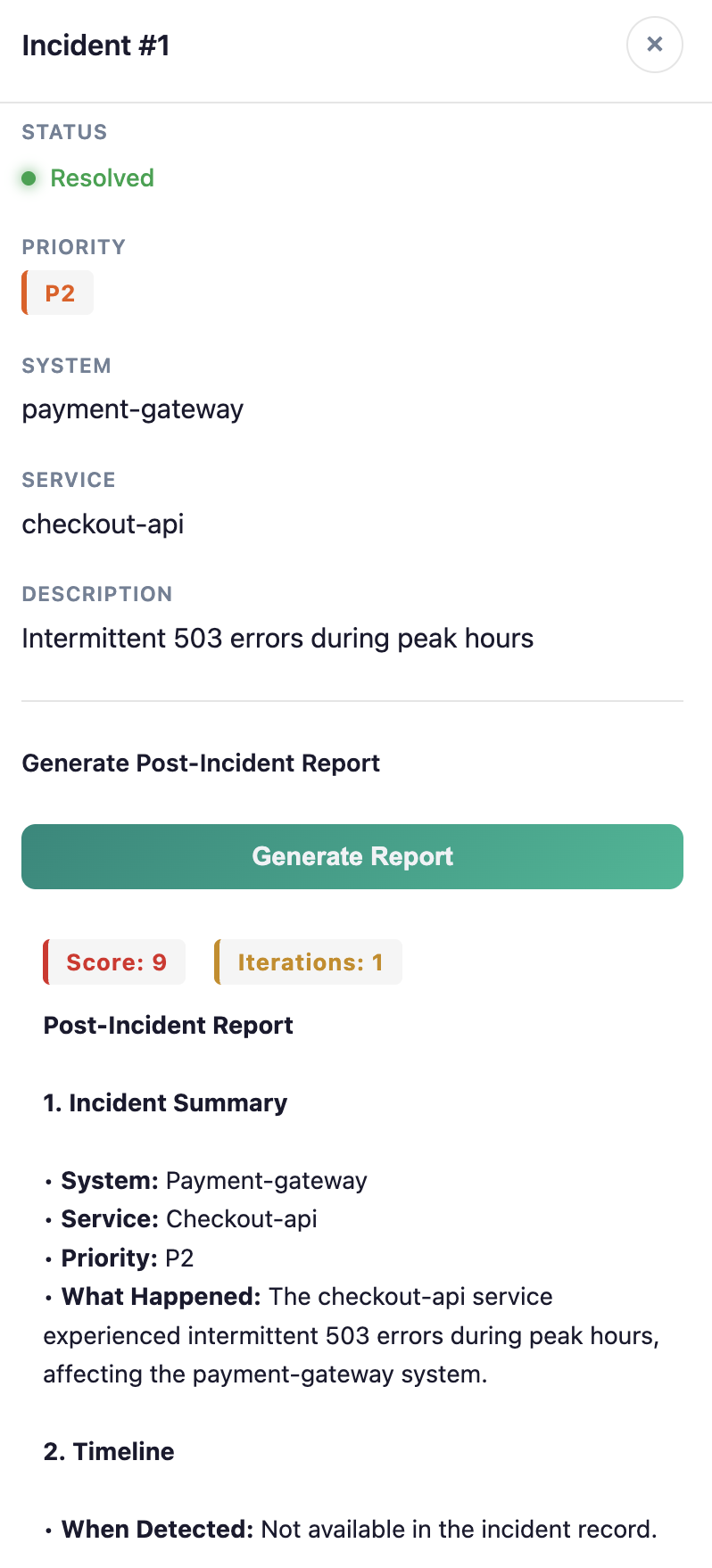
In the Quarkus dev-mode terminal, look for the application log lines below. This example is from a separate local scripted-model run that needed a revision; timestamps and worker names vary:
17:13:55 INFO  [co.in.re.ReportResource] (executor-thread-1) Starting report quality loop for incident #1 (payment-gateway/checkout-api P2)
17:13:55 INFO  [co.in.ag.wo.IncidentReportWorkflow] (ForkJoinPool.commonPool-worker-12) Report Critique -- iteration 1: score=5
17:13:56 INFO  [co.in.ag.wo.IncidentReportWorkflow] (ForkJoinPool.commonPool-worker-12) Report Critique -- iteration 2: score=8
17:13:56 INFO  [co.in.re.ReportResource] (executor-thread-1) Report quality loop completed for incident #1 — final score: 8
Read these lines as one request: the first critique scores 5, so the next draft receives the typed critique and runs again. The second critique scores 8, satisfying score >= 7; the loop stops after two complete draft-and-critique pairs. The dashboard therefore shows score 8 and two iterations for this run. For the screenshot's first-pass result, expect one critique line with score 9, followed by the completion line.
If all three critiques score below 7, the loop stops at its iteration limit and returns the final low score. A completion log means processing finished; it does not mean the quality target was met. These summary logs omit the report body and reviewer feedback.
The exact score and number of revisions can vary with the model response. The supplied scripted tests cover repeatable first-pass success, feedback propagation, and exhausted iteration budgets without paid model calls.
Done when
- The dashboard's existing Generate Report action returns a report, score, and iteration count.
- The two agents are declared with
@Agentand the workflow with@LoopAgent. - Reviewer feedback can reach the next draft through the typed critique.
- You can explain the score threshold, three-iteration limit, and end-of-iteration check.
Optional comparison — Programmatic builder
This comparison is outside the 15-minute core. Keep the same project folder and dev-mode session.
The supplied BuilderReportFlow.java implements the same process using explicit builder configuration. The dashboard continues to use the declarative workflow; the comparison does not replace it.
var workflow = AgenticServices.loopBuilder()
        .name("incident-report-builder-comparison")
        .subAgents(ClientProxy.unwrap(drafter), ClientProxy.unwrap(critic))
        .beforeCall(IncidentReportWorkflow::initialize)
        .maxIterations(3)
        .testExitAtLoopEnd(true)
        .exitCondition(IncidentReportWorkflow::qualitySatisfied)
        .output(IncidentReportWorkflow::result)
        .build();
The builder receives agent instances, so the comparison unwraps their Quarkus CDI client proxies. Declarative subAgents = {...} names the interfaces and lets the framework handle that wiring. Both versions reuse the same initialization, quality predicate, output mapping, and agent prompts.
The builder supplies incident fields through an input map; the declarative method declares those inputs as parameters. Builders are useful when constructing workflows at runtime or adding inline agentAction(...) Java steps. For this fixed two-agent process, the annotation keeps the main orchestration concise.
@LoopAgent vs. builder at a glance
| Design question | Declarative @LoopAgent |
Programmatic builder |
|---|---|---|
| Where is the process defined? | A workflow interface names the sub-agent types and their order. | Java code assembles agent instances and configures the loop. |
| How are incident inputs supplied? | Named method parameters declare the workflow's input contract. | An input map supplies the same incident fields at invocation time. |
| How does the next draft receive feedback? | The critic writes typed critique state; the drafter declares it as an input. |
This comparison uses the same agents and typed critique state. |
| How is initial state set? | @BeforeCall initializes the empty critique. |
.beforeCall(...) reuses the same initialization method. |
| How does the loop stop? | maxIterations = 3 and @ExitCondition(testExitAtLoopEnd = true). |
.maxIterations(3), .testExitAtLoopEnd(true), and .exitCondition(...). |
| How is the dashboard response assembled? | @Output returns the report, score, feedback, and iteration count. |
.output(...) reuses that same mapper. |
| How are agents wired in this Quarkus example? | subAgents = {...} names interfaces; the framework resolves them. |
.subAgents(...) receives instances; this example unwraps CDI client proxies. |
| When is it a good fit? | A fixed workflow whose structure should be easy to read beside its Java method contract. | Runtime workflow assembly or inline agentAction(...) steps for custom Java adaptation. |
Choose the API for the design, not for extra loop capabilities
Both APIs express this same bounded draft-and-critique loop. Initialization, feedback propagation, end-of-iteration checks, and response mapping are available in both forms. We use @LoopAgent as the main exercise because the fixed two-agent structure is concise and consistent with the earlier declarative exercises. The builder makes assembly and Java adaptation explicit when those are the learning goal or application requirement.
The earlier builder implementation needed a refactor, not an annotation swap. It wrapped agent calls and state adaptation in inline actions. The current version declares both agents with @Agent and output keys, passes the typed critique through shared scope, and separates initialization and output hooks. That is why the annotation version can now remain small without changing the demo behavior. Shared-state key names and agent inputs must still agree in either API.
API style and execution runtime are separate choices. AgenticServices.loopBuilder() belongs to LangChain4j; this project's quarkus-flow-langchain4j extension supplies Flow-backed execution for both the builder and declarative workflows. Using the builder is not a requirement for using Quarkus Flow, and choosing either API does not by itself demonstrate durable restart recovery.
In a second terminal in this same folder, run the supplied comparison test:
Tests use an isolated PostgreSQL Dev Services database and a local scripted model; they do not use your paid API key or modify the demo database. The completed solution also tests two-iteration equivalence between the builder and annotation workflows. To run all checks, use ./mvnw test.
Reference: LangChain4j declarative API and Quarkus Flow integration.