Exercise 7 — Remote Agents (A2A)
Run + Read
Timebox: 10 minutes
Persona: Riley — SRE team lead
You work in: solutions/07-a2a/ (run + read)
Reference solution
Enterprise context
Riley, Apex Systems' SRE team lead, owns an impact-assessment capability that other teams also need. The incident supervisor uses it to inform escalation, but other applications could need the same service and SLA reasoning. Keeping the capability inside one application's JVM ties its deployment and scaling to that application, and makes reuse depend on copying or embedding the implementation.
Riley needs a service boundary that lets the SRE team operate the impact agent independently while callers discover and delegate work to it through a defined protocol. This lab runs the caller and impact agent in separate Quarkus processes, so Riley can inspect discovery, delegation, and the network boundary directly. It also makes the dependency visible: the remote agent must be available for the caller to discover it. The two local projects demonstrate that separation without requiring a production deployment platform.
The goal
Run the two A2A applications, inspect the remote agent's AgentCard, and process an incident through the local workflow. Follow how the client discovers and invokes the remote impact agent, then explain what changes when an agent call crosses a service boundary.
The problem
In Exercise 4, every agent ran inside a single process — same JVM, same release cycle, same crash domain. But Riley's SRE team needs ImpactAgent as a remote agent: independent repo, independent release cadence, independently scalable, and reusable by other systems beyond Apex Systems.
Solution: convert ImpactAgent into a remote agent using the A2A (Agent-to-Agent) protocol — the local interface stays the same, but execution happens in a separate process.
Why run + read instead of code-along?
A2A requires two separate Quarkus projects — a remote agent server (:8888) and a client that discovers it via /.well-known/agent-card.json. Setting up cross-project dependencies, A2A agent cards, and the client-side @A2AClientAgent wiring in a 10-minute timebox would be mostly configuration, not learning. Running the working solution lets you focus on how A2A works — AgentCard discovery, task delegation, and the network boundary — rather than debugging multi-module Maven setup.
Start (two terminals) (3 min)
Stop any running Quarkus process first (Ctrl+C). Open two separate terminals at the repo root and run one command block in each:
Start order matters
Wait until Terminal 1 shows Listening on: http://localhost:8888 before starting Terminal 2. The main system discovers the remote agent via its AgentCard at startup — if the remote agent isn't ready, the A2A call will fail.
Verify the AgentCard:
Expected:
{
  "name": "impact-agent",
  "description": "Estimates business impact and SLA cost for incident escalation decisions",
  "version": "1.0.0",
  "capabilities": {
    "streaming": true,
    "pushNotifications": false
  },
  "defaultInputModes": ["text"],
  "defaultOutputModes": ["text"],
  "skills": [
    {
      "id": "impact-assessment",
      "name": "Business impact assessment",
      "description": "Estimates business impact and SLA cost for incident escalation decisions",
      "tags": ["impact-assessment", "sla-analysis"]
    }
  ],
  "url": "http://localhost:8888/",
  "preferredTransport": "JSONRPC"
}
Agentic Dev UI
Open the Agentic Dev UI on the main system (:8080). Notice ImpactAgent now shows as A2AClientAgent (red badge) instead of a local Agent — the framework transparently proxies calls to the remote service.
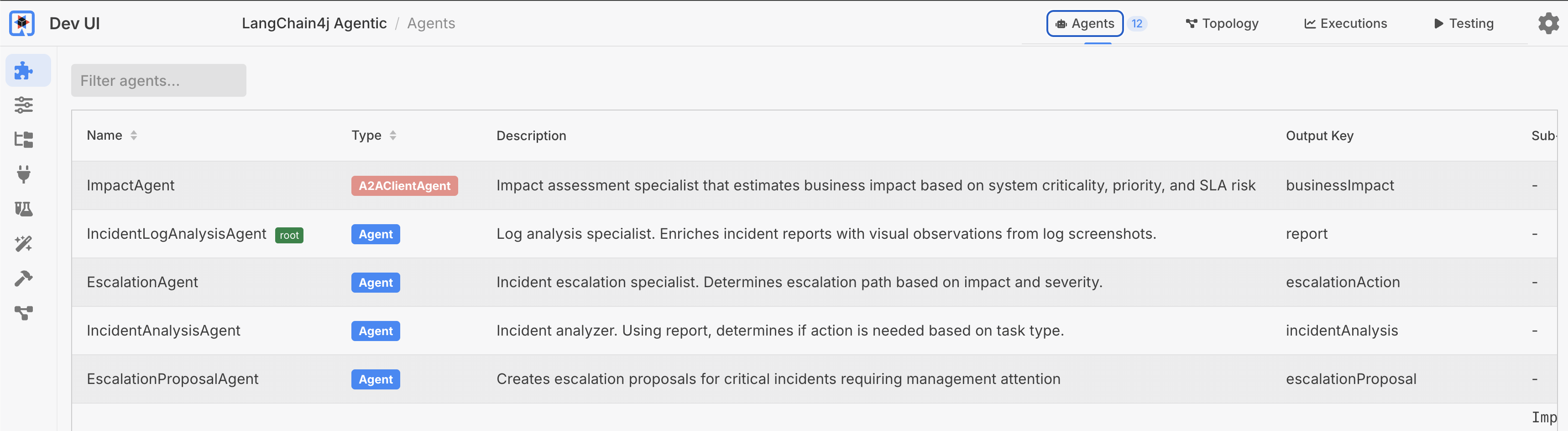
After processing an incident, open Executions and select IncidentProcessingWorkflow in the Root Agent dropdown. The Try it section below walks through execution history and the app's own topology report. Compared with Exercise 4, ImpactAgent is still wired into the same workflow, but execution now happens in a separate JVM on port 8888.
A2A topology display error in quarkus-langchain4j 1.13.1
The Dev UI's Topology tab can show Failed to generate topology: Cannot read the array length because "args" is null when you select IncidentProcessingWorkflow. This is an upstream graph-rendering issue involving the A2A client proxy; the message alone does not mean incident processing failed. After processing an incident, use the app's system report to view the topology, and the Dev UI's Executions tab to inspect the run.
The A2A architecture (2 min)
%%{init: {'look':'handDrawn','theme':'base','themeVariables': {'darkMode':false,'background':'#FFFCF5','primaryTextColor':'#1F1F1F','secondaryTextColor':'#1F1F1F','tertiaryTextColor':'#1F1F1F','textColor':'#1F1F1F','lineColor':'#4A4035','edgeLabelBackground':'#FFFCF5','clusterBkg':'#F5F5F0','clusterBorder':'#6B5B45','fontSize':'18px'},'flowchart': {'nodeSpacing':40,'rankSpacing':55,'useMaxWidth':false,'padding':18}}}%%
flowchart TB
    IPW(["Processing<br/>Workflow"])
    ISA(["Supervisor<br/>Agent"])
    IA(["ImpactAgent<br/>A2AClient"])
    AE(["Agent<br/>Executor"])
    RIA(["ImpactAgent<br/>local LLM"])
    LLM([Result])

    subgraph main["Main App · 8080"]
        IPW
        ISA
        IA
    end

    subgraph remote["Remote Agent · 8888"]
        AE
        RIA
        LLM
    end

    IPW --> ISA --> IA
    IA -->|A2A| AE
    AE --> RIA --> LLM
    LLM -->|Task result| IA

    style IPW fill:#D4E6F1,stroke:#2E6B8A,color:#1F1F1F,stroke-width:2px
    style ISA fill:#FFE4CC,stroke:#B87333,color:#1F1F1F,stroke-width:2px
    style IA fill:#FFF8DC,stroke:#C4A000,color:#1F1F1F,stroke-width:2px
    style AE fill:#E8DCC4,stroke:#6B5B45,color:#1F1F1F,stroke-width:2px
    style RIA fill:#D8F0D8,stroke:#3D7A3D,color:#1F1F1F,stroke-width:2px
    style LLM fill:#E8E0F0,stroke:#6B5B8A,color:#1F1F1F,stroke-width:2px
    style main fill:#F5F5F0,stroke:#8B8070,color:#1F1F1F,stroke-width:2px
    style remote fill:#FFF5F0,stroke:#A08070,color:#1F1F1F,stroke-width:2px
A2A concepts:
| Concept | Meaning | Analogy |
|---|---|---|
| AgentCard | Capability metadata | Service contract |
| AgentExecutor | Server-side request handler | JAX-RS endpoint |
| Task | Stateful goal with input/output | Async job |
| Message | Single synchronous exchange | REST call |
Try it (3 min)
Open http://localhost:8080, click View on an incident that will trigger escalation (e.g., Incident #1, payment-gateway/checkout-api), and process with:
Complete service outage, all API endpoints returning 503, cascading failures across dependent services
How to confirm: The HITL approval modal will appear — click Escalate to Management to continue the workflow. Check the UI for the final incident status (should reach ESCALATED), then inspect the run using the views below.
Open Dev UI execution history
- Open Agentic Dev UI → Executions on the main system (:8080). If you are already on the Agents or Topology tab, click Executions in the top navigation.
- In the Root Agent dropdown at the top-left, select
IncidentProcessingWorkflow. - Click Refresh if the page was open before the incident finished processing.
- Expand the session/run and its agent rows to inspect the calls, durations, token counts, inputs, and outputs.
Why are there two root agents, and why is the default empty?
Before the optional multimodal bonus, this exercise has two roots: IncidentProcessingWorkflow, which handles incidents, and IncidentLogAnalysisAgent, the standalone screenshot-analysis agent that has not yet been added to the workflow. Dev UI lists roots alphabetically and selects IncidentLogAnalysisAgent first. Its execution history is empty because processing an incident does not invoke it. Select IncidentProcessingWorkflow to see your run. Once you wire the bonus agent into the workflow, it becomes a child of that workflow.
View the app's topology and execution report
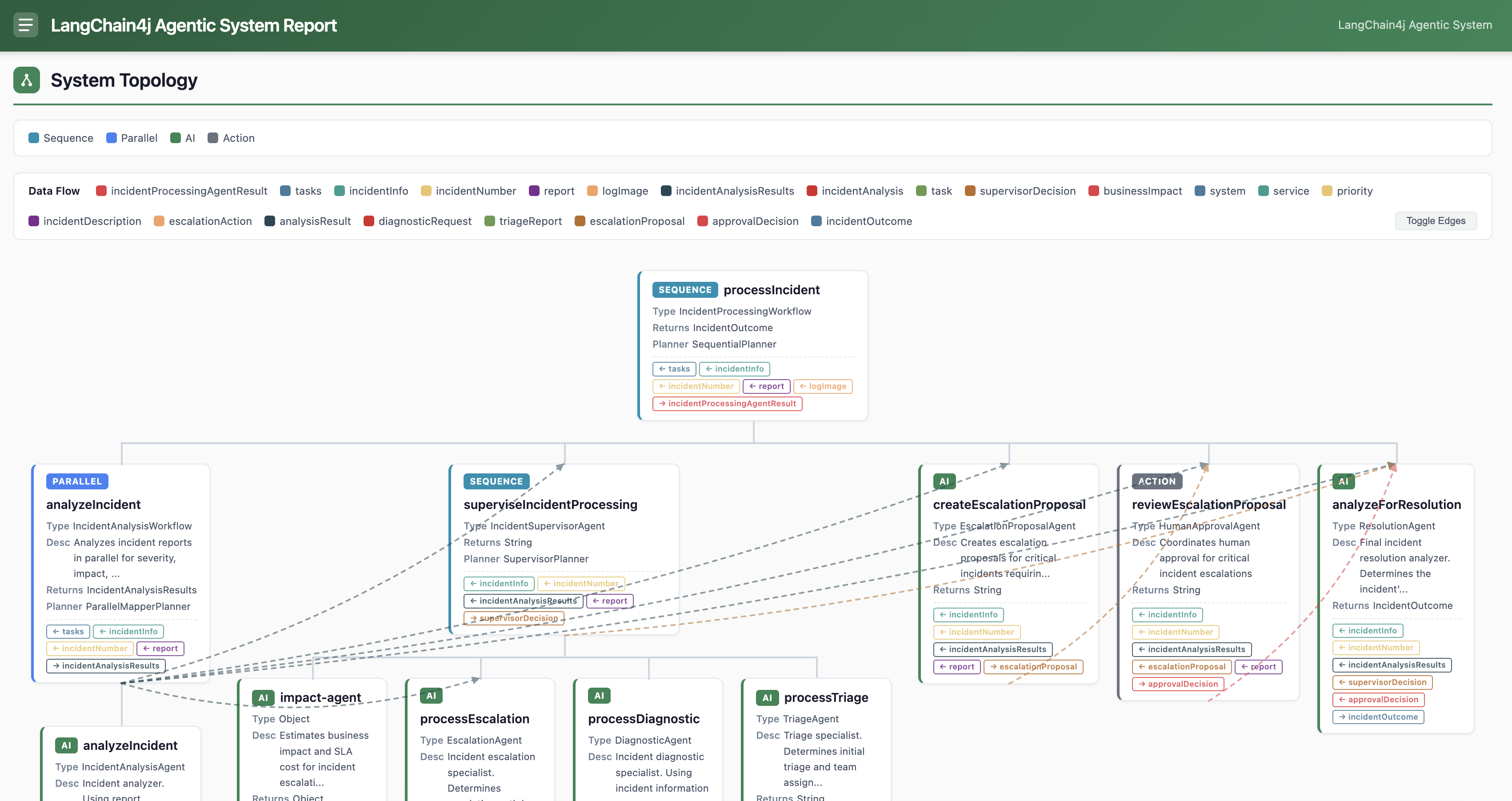
Open http://localhost:8080/incident-management/report to view the app's own report, generated from the workflow's agentMonitor(). The System Topology view shows processIncident at the root, with parallel analysis, the supervisor and remote impact-agent, human approval, and resolution below it:
Scroll below System Topology to Execution History in the same report, then expand a session and its agent rows:
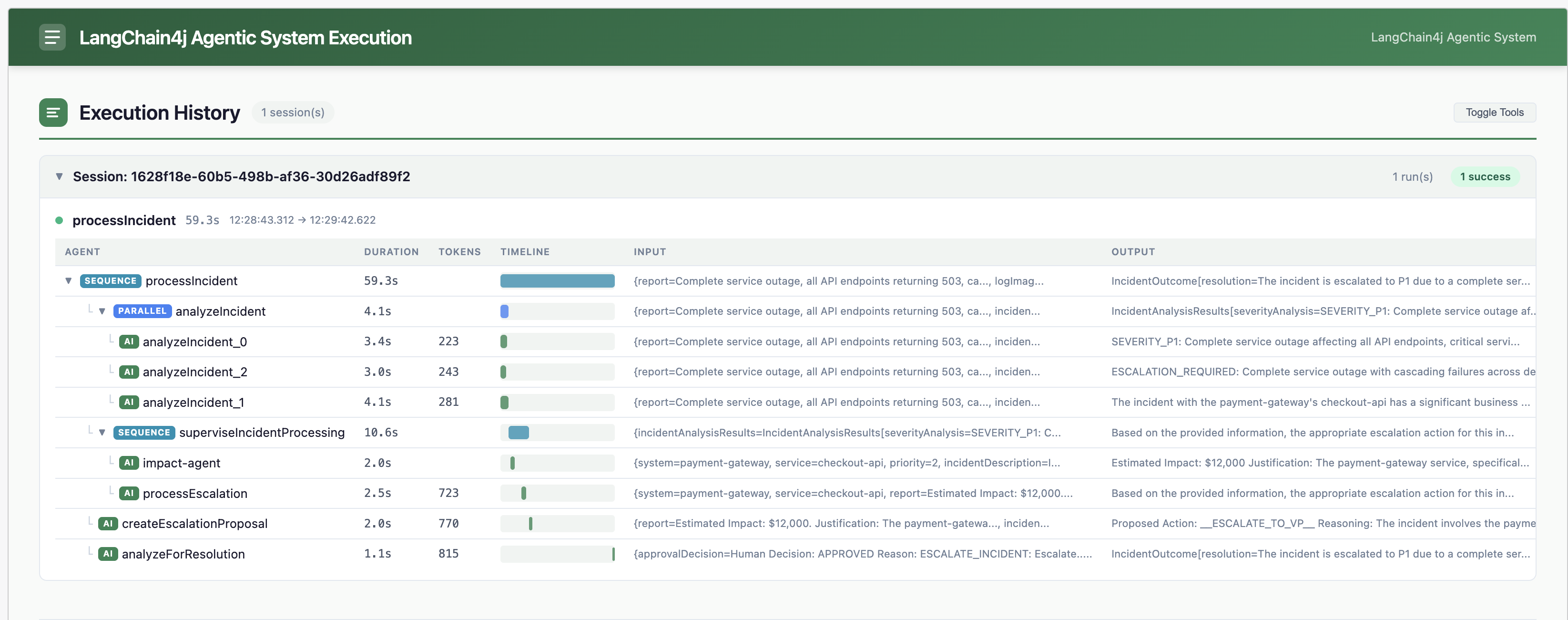
Notice the execution tree: processIncident (SEQUENCE) → analyzeIncident (PARALLEL, 3 analysis agents) → superviseIncidentProcessing (SEQUENCE with impact-agent, processEscalation) → createEscalationProposal → analyzeForResolution. Each row shows duration, token count, input, and output.
Execution history is kept in memory
Process an incident before inspecting execution history. Restarting or hot-reloading the main app clears the recorded runs; process another incident if the selected workflow's history is empty afterward.
Also correlate logs across both terminal windows:
- Terminal 2 (8080): look for
impact-agentinvocation — confirms the supervisor delegated to the A2A agent - Terminal 1 (8888): look for
Remote A2A ImpactAgent calledand the response (e.g.,Estimated Impact: $36,000) - Terminal 2 (8080): look for
HITL Tool: Creating escalation approval proposal— confirms the workflow continued after the A2A round-trip
The key observation: impact-agent appears in the execution tree on port 8080, but it actually ran in a separate JVM on port 8888 via A2A.
MCP vs A2A — when to use each (1 min)
You haven't built an MCP integration in this lab, but the distinction matters for architecture decisions:
| MCP (Model Context Protocol) | A2A (Agent-to-Agent) | |
|---|---|---|
| What crosses the wire | Tool call (function + typed args) | Agent task (goal + natural language) |
| Who reasons | Local LLM uses remote tool | Remote LLM reasons independently |
| Team ownership | Shared capability (weather, search, DB lookup) | Autonomous team agent (impact assessment, legal review) |
| State | Stateless per call | Optionally stateful (task lifecycle) |
| Best for | Shared functionality any agent can call | Delegated decision-making by another team |
| Quarkus annotation | @McpToolBox("name") |
@A2AClientAgent |
Rule of thumb: If the remote service just does something when told exactly what to do → MCP. If it decides something using its own reasoning → A2A.
Trade-offs (1 min)
| Factor | Local agent (Ex 4) | Remote A2A agent |
|---|---|---|
| Latency | In-process | HTTP round-trip |
| Ownership | Shared codebase | Independent repo + release |
| Scaling | Scale whole app | Scale impact service independently |
| Failure mode | Shared crash domain | Network partition risk |
| Reuse | Single app | Any A2A-compatible client |
When to go remote
Start local. Extract to A2A when the agent needs independent scaling, separate ownership (another team maintains it), or cross-system reuse (multiple apps call the same agent). The network hop is a real cost — don't pay it unless you get one of these benefits.
Stop both Quarkus processes (Ctrl+C in each terminal) before moving to Exercise 8 — or keep them running for the optional Bonus — Multimodal log analysis at the end of this page.
Done when
- A2A: impact assessment ran in
:8888(confirmed in remote process logs) - AgentCard verified via
curl - You can contrast MCP vs A2A in one sentence each
- You can explain when to keep an agent local vs make it remote
- (Bonus)
IncidentLogAnalysisAgentwired in, and an uploaded log screenshot enriched the report
Bonus — Multimodal log analysis (optional, +5 min)
Code
Optional bonus — separate from A2A
This task is about multimodal input (an agent that reads an image), which is independent of the A2A material above and adds ~5 min beyond the 10-min exercise. It lives here only because the complete incident-management app is in this exercise — skip it freely without missing anything about remote agents. You'll need both Quarkus processes still running (or restart them).
During a real incident, an SRE rarely has a clean written report — they have a screenshot: a log console, a Grafana panel, a stack trace. In this task you'll let the system read that image by wiring in a multimodal agent, then feed it a picture instead of prose.
The incident detail panel already has a Choose File button (accept="image/*"), and IncidentLogAnalysisAgent already exists — but it isn't wired into the workflow yet, so the upload currently has no effect. You'll connect it.
How it works
IncidentLogAnalysisAgent is a vision agent: it takes the current report plus an ImageContent, sends both to the multimodal model (gpt-4o), and rewrites the report with what it sees — merged into a single description.
@SystemMessage("""
    You are a log analysis specialist... If a screenshot of logs, dashboards, or error
    messages is provided, analyze it and rewrite the incident report taking account of
    your visual observations (error patterns, stack traces, resource utilization,
    anomalous metrics, alert states, etc.)...
    """)
@UserMessage("Report: {report}")
@Agent(description = "Enriches incident reports with visual observations from log screenshots.",
        outputKey = "report", optional = true)   // (1)
String analyzeIncidentLogs(String report, @UserMessage @V("logImage") ImageContent logImage);
outputKey = "report"means this agent overwrites thereportvariable. So it must run before the parallel analysis reads it — i.e. it has to be the first step in the sequence.
Your task
Open solutions/07-a2a/multi-agent-system/src/main/java/com/incidentmanagement/agentic/workflow/IncidentProcessingWorkflow.java and add IncidentLogAnalysisAgent.class as the first sub-agent (there's a TODO marking the spot):
@SequenceAgent(outputKey = "incidentProcessingAgentResult",
        subAgents = {
                      IncidentLogAnalysisAgent.class,   // (1) runs first, enriches "report"
                      IncidentAnalysisWorkflow.class,
                      IncidentSupervisorAgent.class,
                      EscalationProposalAgent.class,
                      HumanApprovalAgent.class,
                      ResolutionAgent.class })
- Add the import too:
import com.incidentmanagement.agentic.agents.IncidentLogAnalysisAgent;
Why first?
The sequence passes variables by name through the agentic scope. logImage enters at processIncident(...); the vision agent consumes it and rewrites report; every downstream agent (parallel analysis, supervisor, resolution) then works from the enriched report. Put it anywhere later and the analysis would already have run on the raw text.
Save — Quarkus dev mode hot-reloads. (If you edited while stopped, restart Terminal 2 with ./mvnw quarkus:dev.)
Try it with a log screenshot
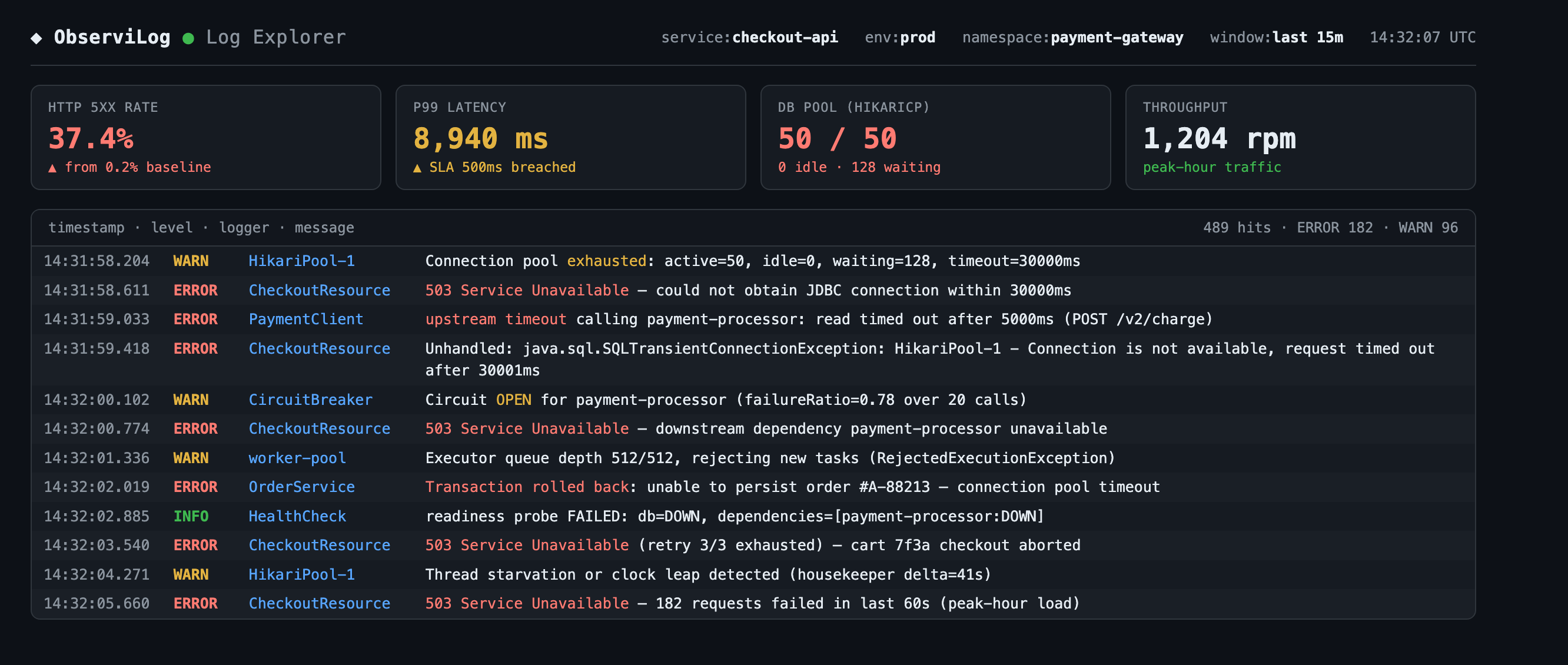
A ready-made sample screenshot ships with the project — a mock observability console for the checkout-api 503 incident (real, readable text so the model can actually parse it):
- Open http://localhost:8080 and click View on Incident #1 (payment-gateway / checkout-api).
- Click Choose File and select
solutions/07-a2a/multi-agent-system/sample-data/checkout-api-503-incident.png. - Leave the report box empty (or add a short note) and process the incident.
How to confirm: In the execution report, the tree now starts with analyzeIncidentLogs, and its output report contains details that only appear in the image — HikariCP connection-pool exhaustion (50/50, 128 waiting), upstream payment-processor timeouts, and the circuit breaker in OPEN state. Those observations then flow into severity/impact analysis and the escalation decision.
Compare with and without the image
Process once with no file and once with the screenshot. Same incident, but the enriched run gives the downstream agents far more to reason about — that's the multimodal payoff.
Vision needs a multimodal model
This works because application.properties uses gpt-4o. A text-only model would reject the ImageContent. IncidentLogAnalysisAgent is optional = true, so if no image is uploaded it returns the report unchanged and the workflow proceeds normally.
When you're done, stop both Quarkus processes (Ctrl+C in each terminal) before moving to Exercise 8.