Exercise 1 — Agent + Tool: TriageAgent + TriageTool
Code-Along
Timebox: 15 minutes
Persona: Sam — NOC analyst
You work in: lab/ (keep Quarkus running — hot reload)
Files to edit:
lab/src/main/java/com/incidentmanagement/agentic/agents/TriageAgent.javalab/src/main/java/com/incidentmanagement/agentic/workflow/TriageWorkflow.javalab/src/main/java/com/incidentmanagement/agentic/tools/TriageTool.java
Solution fallback
solutions/01-first-agent — open if stuck.
Enterprise context
Sam, Apex Systems' NOC analyst, owns the first response to incoming incident reports. During a shift, Sam sees both urgent service failures and reports that turn out to be false alarms. A payment-gateway error needs attention; a transient issue that cleared after a cache refresh may need no further triage. Reading every report and updating each incident manually slows the queue and makes handling depend on who is on duty.
Sam needs an assistant that interprets an operator's report and takes a specific, visible action when triage is warranted. This lab establishes that boundary: the agent decides whether to request triage, while a transactional tool updates the incident record. By checking both the dashboard status and tool-call logs, Sam can distinguish an action the system actually recorded from advice the model merely generated.
The goal
Declare your first agent + tool pair: the agent reasons over natural-language incident reports, and the tool acts on the real world (mutating database state). By the end, processing a critical report flips status to TRIAGING with a tool call in the logs; a minor report produces TRIAGE_NOT_REQUIRED with no tool call.
The agent+tool pattern is the fundamental building block of agentic AI: the LLM decides, the tool executes. Everything else in this lab builds on this pattern.
Step 0 — Start the lab project (2 min)
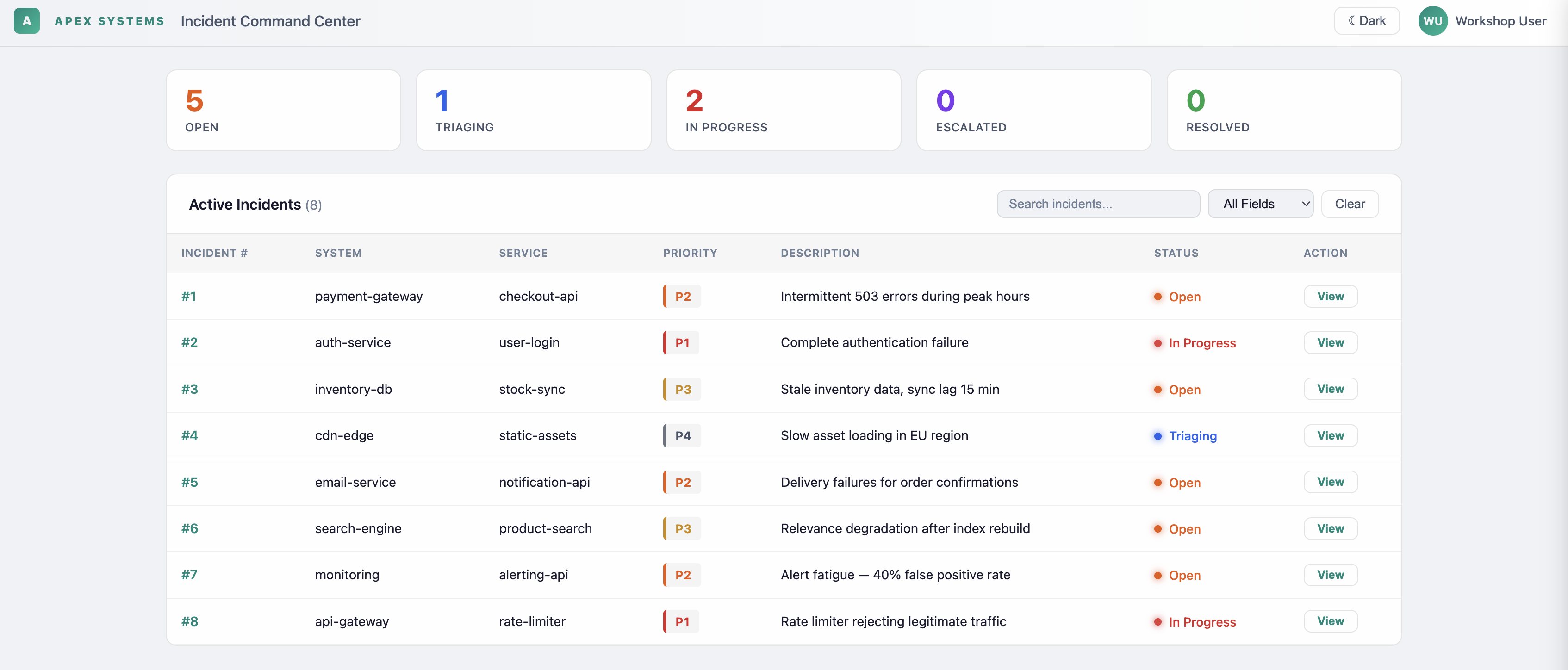
Open http://localhost:8080 — you'll see the Incident Dashboard with 8 seeded incidents but no agent behavior yet (processing will fail — that's expected, you haven't wired the agents).
Step 1 — Implement TriageAgent (5 min)
Open TriageAgent.java.
The method signature is already declared. Add these annotations above it:
@SystemMessage("""
    You handle intake for the triage department of an IT incident management system.
    It is your job to submit a request to the provided requestTriage function
    to take action based on the provided incident report.
    Be specific about what triage actions are needed.
    If no triage action is needed based on the report, respond with "TRIAGE_NOT_REQUIRED".
    """)
@UserMessage("""
    Incident Information:
    System: {incidentInfo.system}
    Service: {incidentInfo.service}
    Priority: P{incidentInfo.priority}
    Incident Number: {incidentNumber}

    Report: {report}
    """)
@Agent(description = "Triage specialist. Determines initial triage and team assignment.",
       outputKey = "analysisResult")
@ToolBox(TriageTool.class)
Why outputKey = \"analysisResult\"?
AgenticScope is a shared context map passed through a workflow. Every agent writes its result under its outputKey so the next agent can read it. Without outputKey, the result is silently dropped and downstream agents find nothing. This is the single most common cause of workflow failures.
Why is this an interface, not a class?
Quarkus LangChain4j generates the CDI proxy at build time. The framework manages the LLM call, message formatting, and tool invocation. You declare what to do via annotations; the framework handles how.
Step 1b — Put the agent in an agentic system
Open TriageWorkflow.java and add this annotation above processTriage:
Also add @Output above the existing output method. It returns the value that
TriageAgent stored under analysisResult:
Even a one-agent entry point must establish an agentic system. Calling an @Agent
method directly creates only a temporary standalone scope and the framework warns that
the invocation is improper. TriageWorkflow establishes the AgenticScope now and can
grow into the multi-agent workflows used in later exercises.
Step 2 — Implement TriageTool (4 min)
Open TriageTool.java.
Add the following method inside the class (replace the // TODO block):
@Tool("Requests initial triage with the specified options")
@Transactional
public String requestTriage(
        Integer incidentNumber,
        String system,
        String service,
        Integer priority,
        boolean assignOnCall,
        boolean notifyStakeholders,
        boolean createWarRoom,
        boolean linkRelatedIncidents,
        String triageNotes) {

    IncidentInfo incidentInfo = IncidentInfo.findById(incidentNumber);
    if (incidentInfo != null) {
        incidentInfo.status = IncidentStatus.TRIAGING;
        incidentInfo.persist();
    }

    StringBuilder summary = new StringBuilder();
    summary.append("Triage requested for ").append(system).append("/")
           .append(service).append(" (P").append(priority).append("), Incident #")
           .append(incidentNumber).append(":\n");
    if (assignOnCall)        summary.append("- Assign on-call engineer\n");
    if (notifyStakeholders)  summary.append("- Notify stakeholders\n");
    if (createWarRoom)       summary.append("- Create war room\n");
    if (linkRelatedIncidents) summary.append("- Link related incidents\n");
    if (triageNotes != null && !triageNotes.isEmpty())
        summary.append("Notes: ").append(triageNotes);

    Log.info("  └─ TriageTool activated for incident #" + incidentNumber);
    return summary.toString();
}
Why @Transactional here but not on TriageAgent?
IncidentInfo.persist() writes to the PostgreSQL database. JPA requires an active transaction for mutations. TriageAgent is an LLM-backed interface (no JPA operations) — adding @Transactional there would have no effect and would mislead future readers.
Why @ApplicationScoped on the tool class?
Tools are CDI beans injected into the LLM call context. They must be scoped. @ApplicationScoped is the correct scope — tools hold no per-request state.
Save all three files. Quarkus hot-reloads automatically.
Step 3 — Understand the agent loop
Before testing, trace the execution path in your head:
%%{init: {'look':'handDrawn','theme':'base','themeVariables': {'darkMode':false,'background':'#FFFCF5','primaryTextColor':'#1F1F1F','secondaryTextColor':'#1F1F1F','tertiaryTextColor':'#1F1F1F','textColor':'#1F1F1F','lineColor':'#4A4035','edgeLabelBackground':'#FFFCF5','clusterBkg':'#F5F5F0','clusterBorder':'#6B5B45','fontSize':'16px'},'flowchart': {'nodeSpacing':35,'rankSpacing':55,'padding':18}}}%%
flowchart TD
    A(["TriageWorkflow.processTriage()"])
    B{"LLM: Critical?"}
    C(["TriageTool.requestTriage()"])
    D["status → TRIAGING"]
    E["TRIAGE_NOT_REQUIRED"]
    F["status → RESOLVED"]
    G(["AgenticScope: analysisResult"])

    A -->|"@UserMessage"| B
    B -->|Yes| C --> D --> G
    B -->|No| E --> F --> G

    style A fill:#D4E6F1,stroke:#2E6B8A,color:#1F1F1F,stroke-width:2px
    style B fill:#FFE4CC,stroke:#B87333,color:#1F1F1F,stroke-width:2px
    style C fill:#FFF8DC,stroke:#C4A000,color:#1F1F1F,stroke-width:2px
    style D fill:#FFF8DC,stroke:#C4A000,color:#1F1F1F,stroke-width:2px
    style E fill:#D8F0D8,stroke:#3D7A3D,color:#1F1F1F,stroke-width:2px
    style F fill:#D8F0D8,stroke:#3D7A3D,color:#1F1F1F,stroke-width:2px
    style G fill:#E8DCC4,stroke:#000000,color:#1F1F1F,stroke-width:2px
The LLM decides whether to call the tool based on the @SystemMessage policy. If the report says "false alarm, no action needed", the LLM returns TRIAGE_NOT_REQUIRED directly — no tool call, and the service resolves the incident.
Step 4 — Test it (4 min)
Open http://localhost:8080, click View on Incident #5 (email-service/notification-api, status: OPEN), and process it with:
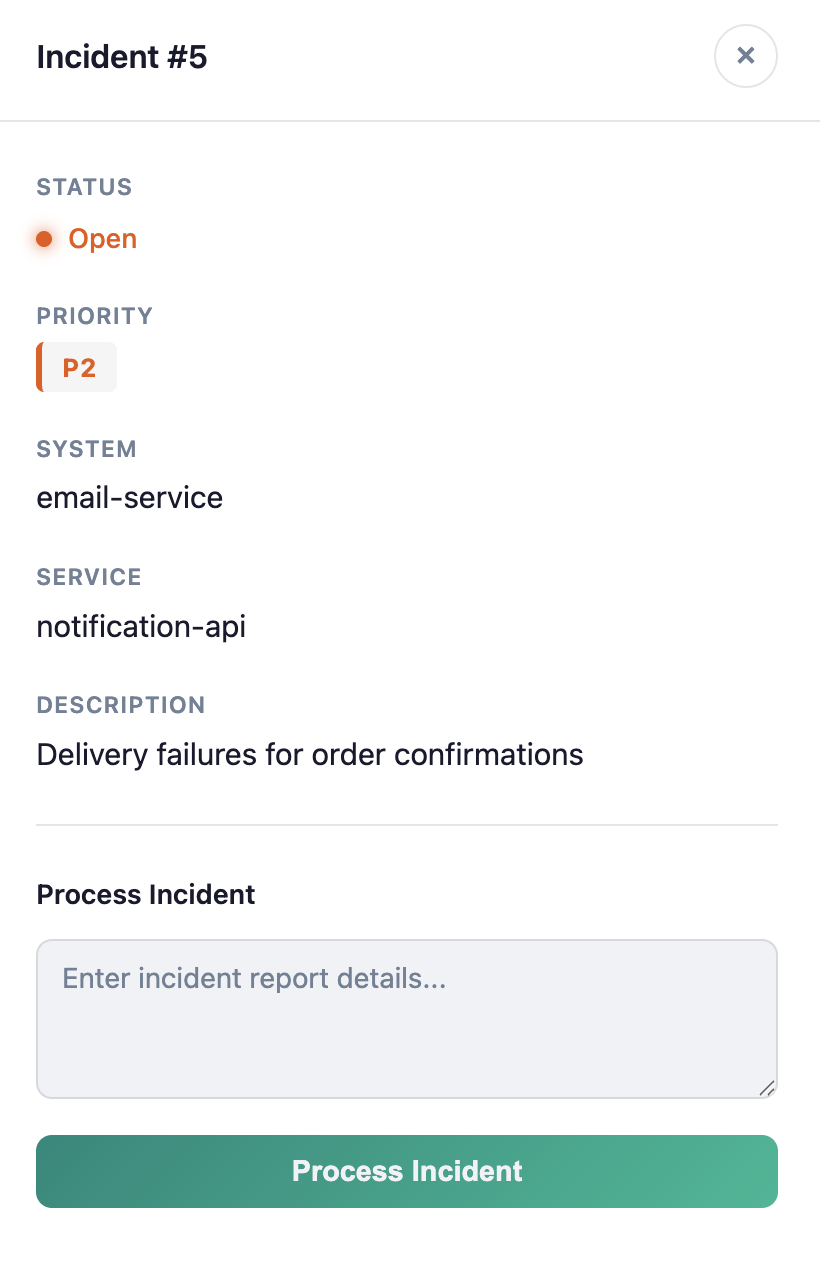
Enter this report in the detail panel:
Expected terminal logs:
There should be no standalone-agent warning. IncidentManagementService invokes
TriageWorkflow, which runs TriageAgent inside an agentic system.
Expected UI: Incident #5 status → TRIAGING
Agentic Dev UI
Open the Agentic Dev UI to see all registered agents, their outputKey, sub-agents, and wiring. This is the fastest way to confirm your agent compiled and was picked up by the framework.
Now process Incident #6 (search-engine/product-search, status: OPEN) with:
Expected: UI status changes to RESOLVED; no TriageTool activated in terminal logs — the LLM decided no action was needed.
Done when
- Tool call visible in logs for critical incident; status changes to
TRIAGING - No tool call for false-alarm report; status changes to
RESOLVED - You can explain from memory: why
@Transactionalon the tool but not the agent - You can explain from memory: what
outputKeydoes and what breaks without it
Note
Keep Quarkus running — Exercise 2 adds the next agent with hot reload.