Enterprise Agentic AI: Architecting Autonomous Java Systems for Production
Three workshop parts · Separate 90-minute event slots
Quick access
Short URL for this guide: bit.ly/agents-labs — share it or bookmark it.
Build intelligent, secure, and observable multi-agent applications on Quarkus. Part 1 introduces agents, supervisor orchestration, human-in-the-loop approval, OpenTelemetry tracing, and A2A remote agents. Part 2 adds required MCP evidence, validated planning, memory eviction and isolation, majority-or-review voting, and persisted Kafka processing outcomes. Part 3 adds runtime skills, output guardrails, asynchronous approval, full-restart recovery, deterministic regression tests, and quality evaluation. Each part fits its own 90-minute event slot; Parts 2 and 3 each have 75 minutes of core labs and 15 minutes of session overhead.
Prerequisites
Confirm these before the workshop starts:
| Requirement | Check |
|---|---|
| Java 25+ | java -version and javac -version |
| Maven 3.9+ | mvn -version, or use ./mvnw in each exercise |
| Quarkus | ./mvnw quarkus:dev |
| OpenCode CLI or any AGENTS.md-compatible AI assistant | Install and configure before the workshop |
| LLM API key | OPENAI_API_KEY (OpenAI, Anthropic, or compatible provider) |
| Free ports 8080, 8888 | One process per exercise set |
| Docker or Podman | For Quarkus Dev Services (PostgreSQL, LGTM, and Kafka in Part 2) |
Install Java 25
Install a JDK 25 so you have both the Java runtime and compiler. Eclipse Temurin 25 provides packages for different operating systems and CPU architectures; choose the latest available Java 25 patch release.
With Homebrew installed, install Temurin 25 and select it for the current terminal:
brew install --cask temurin@25
export JAVA_HOME=$(/usr/libexec/java_home -v 25)
export PATH="$JAVA_HOME/bin:$PATH"
Add the two export lines to ~/.zshrc to keep this selection in new Zsh terminals. If you use Bash, add them to your Bash startup file instead.
Install SDKMAN! in Bash or Zsh (skip the first command if it is already installed):
In the list, find the latest stable Java 25 entry under Temurin and copy its full Identifier ending in -tem. Press q to exit the list. Replace JAVA_25_IDENTIFIER below with that identifier, then run:
sdk install java JAVA_25_IDENTIFIER
sdk use java JAVA_25_IDENTIFIER
sdk default java JAVA_25_IDENTIFIER
SDKMAN! sets JAVA_HOME and PATH; sdk use selects the JDK in this terminal, and sdk default selects it for new terminals. See the SDKMAN! usage guide. For WSL, install the JDK inside WSL and run the workshop commands there.
Download the Windows JDK 25 MSI installer from Eclipse Temurin. Run it and, on Custom Setup, enable both Add to PATH and Set JAVA_HOME. Finish installation, then reopen your terminal and IDE so they pick up the new environment. See the official Windows installation guide.
If you use WSL for the workshop, follow the Linux / WSL tab instead.
Verify the selected JDK in the terminal you will use for the workshop:
Both should report 25 (or a newer version). After cloning the repository below, run ./mvnw -version from lab/ and check that Maven also reports Java version: 25 or newer (.\mvnw.cmd -version in Windows PowerShell). If Maven reports an older Java version, update JAVA_HOME to the JDK installation directory and put its bin directory first in PATH. Set your IDE's project JDK and Maven runner JDK to the same version.
Install Maven 3.9+
Install Java 25 first, then choose an installation method below. See the official Apache Maven installation guide for more options.
Maven Wrapper — no separate Maven installation needed
The workshop projects include mvnw and mvnw.cmd. After cloning the repository, run ./mvnw -version from lab/ (or .\mvnw.cmd -version in Windows PowerShell). The wrapper downloads and uses the Maven version configured for that project; its first run requires internet access. The exercise commands already use the wrapper. A JDK is still required.
With Homebrew installed:
After installing SDKMAN! as shown in the Java setup:
Accept the prompt to make Maven the default. If Maven is already installed through SDKMAN!, use sdk list maven to choose a stable 3.9.x release and select it with sdk install maven VERSION, sdk use maven VERSION, and sdk default maven VERSION, replacing VERSION with the version from the list. Run these commands inside WSL if that is your workshop environment.
- Download the latest stable Maven 3.9.x Binary zip archive from Apache Maven downloads.
- Extract it to a permanent folder, such as
C:\Tools. Add the extracted Maven folder'sbindirectory to your user Path using Edit environment variables for your account. For example, Maven 3.9.16 would useC:\Tools\apache-maven-3.9.16\bin; use the version you actually extracted. -
Keep
JAVA_HOMEpointing to your JDK 25 installation. Open a new PowerShell window and run:
Check that the output reports Apache Maven 3.9 or newer and Java version: 25 or newer. If mvn is not found, check Maven's bin entry in PATH and reopen the terminal. If the Java version is older, correct JAVA_HOME using the Java instructions above. Your globally installed mvn and a project's ./mvnw can use different Maven versions; verify the command you plan to run.
Get the code
git clone https://github.com/danieloh30/agentic-ai-java-workshop.git
cd agentic-ai-java-workshop
export OPENAI_API_KEY=sk-your-key-here

# Your working project — start here for Exercise 1
cd lab
./mvnw quarkus:dev
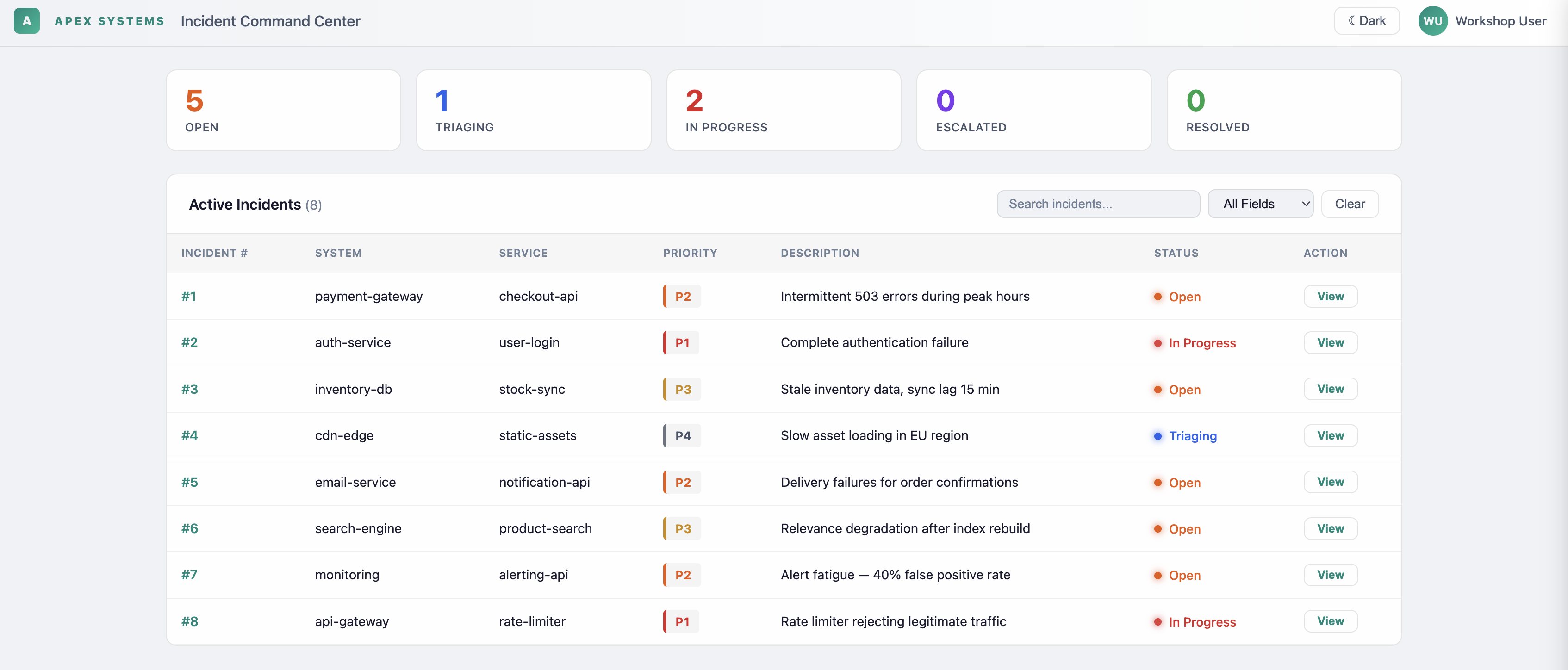
Open http://localhost:8080 — Incident Dashboard with 8 seeded incidents and status cards. No agent behavior yet: that's Exercise 1.
Starting Part 2 instead?
From the repository root, run cd part2/lab and ./mvnw quarkus:dev once. Keep that folder and terminal for all six exercises, using the Workflow selector for Planning / MCP, Memory, Voting, or Events / Replay. The incident action changes to Generate recommendation, Send message, Run vote, or Submit event; switching workflows does not start work or reset data. The completed route uses part2/solution/. PostgreSQL, Kafka, and the MCP fixture start up front; normal hot reload preserves existing exercise records. No manual reset or restart is needed between Part 2 exercises.
Reference solutions
Part 1 references live in solutions/. Parts 2 and 3 use part2/solution/ and part3/solution/. Choose starter or completed code at the start of a part and keep that folder; compare individual files when stuck.
Exercises
Starting Part 3 instead?
From the repository root, run cd part3/lab, export OPENAI_API_KEY, then run ./dev.sh. Choose part3/solution for completed code. Keep that folder throughout Exercises 15–20. Follow Exercise 15 for setup and preflight. Exercise 18 deliberately restarts the JVM with the database retained.
Part 1 — Fundamental Patterns
Build the foundations of agentic incident management for Apex Systems through seven short exercises. Start with a declarative agent that calls a tool, then add prompt-based policies, parallel specialists, and supervisor orchestration. Apply coding-assistant governance, introduce human approval and tracing, and delegate impact assessment to a remote agent over A2A.
Designed for a 90-minute session, with 80 minutes of hands-on work and a 10-minute introduction. Begin in the shared lab/ project, then follow the guides into the runnable approval, observability, and A2A examples. Exercise 8 is an optional 15-minute bonus that adds a report-quality loop after the core session.
| Exercise | Time | Focus |
|---|---|---|
| 1. Agent + tool | 15 min | TriageAgent + TriageTool |
| 2. Policy as prompt | 10 min | DiagnosticAgent + @SystemMessage as policy |
| 3. Parallel agents | 10 min | @ParallelMapperAgent + @Output |
| 4. Supervisor orchestration | 15 min | Full multi-agent supervisor |
| 5. AI governance | 10 min | AGENTS.md + OpenCode CLI |
| 6. Human gate + tracing | 10 min | Human-in-the-loop + OpenTelemetry |
| 7. Remote agents (A2A) | 10 min | Distributed impact assessment agent |
| 8. Quality loop (bonus) | 15 min | Declarative @LoopAgent + optional builder comparison |
Part 2 — From Patterns to Production (Advanced & Enterprise)
Six short exercises provide 75 minutes of hands-on work in a 90-minute session. Use one shared project (part2/lab/ or part2/solution/) and the same Quarkus dev-mode terminal from Exercise 9 through 14. Save edits for hot reload; select the dashboard mode rather than copying/resetting projects. Preflight container and dependency downloads before the session.
| Exercise | Time | Focus |
|---|---|---|
| 9. Structured Planning | 15 min | Validated specialist plans, bounded review, and explicit recommendation readiness |
| 10. Required MCP Evidence | 10 min | A required tool lookup before planning; fail closed when evidence is unavailable |
| 11. Memory Boundaries | 10 min | Conversation isolation and observable eviction from the PostgreSQL-backed window |
| 12. Voting and Disagreement | 15 min | Parallel specialist ballots and deterministic majority-or-review policy |
| 13. Event-Driven Processing | 10 min | A sequential agent workflow triggered by Kafka, with correlated outcomes |
| 14. Persistent Outcomes and Replay | 15 min | Reuse completed work after hot reload and inspect durable, duplicate-safe outcomes |
Part 3 — Reliable Response and Evaluation
Six short exercises provide 75 minutes of hands-on work in a 90-minute session. Choose part3/lab/ for code-along or part3/solution/ for completed code, then stay in that folder throughout. The same Apex incident response moves from a runtime skill to a guarded recommendation, asynchronous approval, restart recovery, regression checks, and a measured quality experiment.
The supplied launcher starts persistent PostgreSQL before Quarkus dev mode. Edits use hot reload; Exercise 18 deliberately restarts the JVM once to prove a pending approval survives. No reset commands or per-exercise project switches are needed. Evaluation plumbing, the fixed dataset and scripted test server are supplied; learner tasks stay small.
| Exercise | Time | Workspace |
|---|---|---|
| 15. Runtime Skills | 10 min | Skills & guardrails |
| 16. Runtime Output Guardrails | 10 min | Skills & guardrails |
| 17. Asynchronous Approval | 15 min | Approval & recovery |
| 18. Restart Recovery | 15 min | Approval & recovery |
| 19. Deterministic Regression Tests | 10 min | Tests & evaluation |
| 20. Quality Evaluation | 15 min | Tests & evaluation |
Start with Exercise 15 and preflight dependency/container downloads before the event. Live evaluation uses paid model calls; automated regression tests use a local scripted model and an isolated test database.
Start with the Lab Overview to understand the scenario, architecture, and learning path.
Repository layout
| Path | Purpose |
|---|---|
lab/ |
Your hands-on Quarkus project (stub files with // TODO) |
AGENTS.md |
Project context file for AI assistants — rules, agent inventory, and conventions loaded once to avoid repeated file scans |
docs/ |
These lab instructions (this site) |
solutions/ |
Reference solution projects for each exercise — copy files from here if you get stuck |
solutions/08-quarkus-flow/lab/ |
Separate starter project for the bonus exercise (not the root lab/) |
part2/lab/ |
Shared runnable starter for Exercises 9–14; keep dev mode running |
part2/solution/ |
Completed shared Part 2 application |
part3/lab/ |
Shared starter for Exercises 15–20, started with ./dev.sh |
part3/solution/ |
Completed Part 3 application |