Exercise 6 — Human Gate + Tracing
Run + Read
Timebox: 10 minutes
Persona: Alex — Compliance officer
You work in: solutions/06-hitl-observability (run + read)
Solution
Enterprise context
Alex, Apex Systems' compliance officer, needs evidence that automation respects the company's escalation policy. A P1 or P2 incident on a revenue-critical service can trigger a management escalation with operational and business consequences. Alex needs the system to distinguish a proposed escalation from an approved action, and to make the human decision visible when someone later reviews how the incident was handled.
This lab places a human approval gate between the agent's proposal and the recorded outcome. Alex can approve or reject the proposal in the UI, then inspect traces to follow the agent calls and approval path. Running both decisions shows whether the workflow follows the reviewer rather than treating an LLM recommendation as authorization. The combination of a gate and tracing gives Alex a concrete way to inspect the policy boundary instead of relying on a prompt that merely asks the model to be careful.
The goal
The compliance rule: no autonomous escalation of P1/P2 incidents on revenue-critical systems.
Without a gate, the supervisor you built in Exercise 4 would ESCALATE a P1 payment-gateway outage based purely on LLM reasoning.
With @HumanInTheLoop, the system proposes and pauses — a human approves or rejects. And with OpenTelemetry tracing, every LLM call, tool invocation, and approval decision is auditable.
This exercise introduces two concepts: EscalationProposalAgent (an LLM agent that creates escalation proposals) and @HumanInTheLoop (a gate that pauses the workflow until a human decides).
Why run + read instead of code-along?
Quarkus validates all @Agent parameters at build time against the workflow's AgenticScope output keys. HITL agents depend on outputs from each other (escalationProposal → approvalDecision), so adding a stub to lab/ without wiring the full chain causes IllegalConfigurationException. Plus, HumanApprovalAgent is infrastructure code (CompletableFuture, ApprovalService, timeout handling) — not a 3-minute paste. So you run the working solution and focus on understanding the pattern rather than fighting build errors.
%%{init: {'look':'handDrawn','theme':'base','themeVariables': {'darkMode':false,'background':'#FFFCF5','primaryTextColor':'#1F1F1F','secondaryTextColor':'#1F1F1F','tertiaryTextColor':'#1F1F1F','textColor':'#1F1F1F','lineColor':'#4A4035','edgeLabelBackground':'#FFFCF5','clusterBkg':'#F5F5F0','clusterBorder':'#6B5B45','fontSize':'16px'},'flowchart': {'nodeSpacing':35,'rankSpacing':55,'padding':18}}}%%
flowchart TD
    ISA(["IncidentSupervisorAgent<br/>escalation required"])
    EPA(["EscalationProposalAgent<br/>proposed action ESCALATE_P1"])
    HITL{"HumanInTheLoop gate<br/>Awaiting Approval"}
    ESC([ESCALATED])
    RES([RESOLVED])

    ISA --> EPA --> HITL
    HITL -->|Escalate to Management| ESC
    HITL -->|Resolve Incident| RES

    style ISA fill:#FFE4CC,stroke:#B87333,color:#1F1F1F,stroke-width:2px
    style EPA fill:#D8F0D8,stroke:#3D7A3D,color:#1F1F1F,stroke-width:2px
    style HITL fill:#FFF8DC,stroke:#C4A000,color:#1F1F1F,stroke-width:2px
    style ESC fill:#D8F0D8,stroke:#3D7A3D,color:#1F1F1F,stroke-width:2px
    style RES fill:#D4E6F1,stroke:#2E6B8A,color:#1F1F1F,stroke-width:2px
Step 1 — Start and read the HITL agents (3 min)
Stop your lab/ Quarkus process first (Ctrl+C), then start the solution:
Wait for the LGTM stack:
DevServices for Observability started — Grafana: http://localhost:3000
incident-management started in ~4s
First start may be slow
The LGTM container (Grafana + Loki + Tempo + Mimir) is pulled on first run and can take 1–2 minutes. If http://localhost:3000 isn't reachable, wait for the DevServices for Observability started log line before proceeding. If it doesn't appear, restart dev mode (Ctrl+C then ./mvnw quarkus:dev).
Agentic Dev UI
Open the Agentic Dev UI to see the full agent graph. Notice EscalationProposalAgent and HumanApprovalAgent — the HITL gate shows up as a distinct agent type in the wiring view.
Check the topology — compare it to Exercise 4. The tree now includes the HITL agents.
Open EscalationProposalAgent.java — this is the same @Agent pattern you've been coding, with a @SystemMessage that defines escalation criteria and a @UserMessage template.
Open HumanApprovalAgent.java — this is the HITL gate. Key differences from a regular @Agent:
| Annotation | Purpose |
|---|---|
@HumanInTheLoop |
Human gate — pauses the workflow here |
static method |
Not an LLM call — blocks until human input via CompletableFuture |
Why a separate proposal agent?
EscalationProposalAgent creates a structured proposal — the what and why of the escalation. HumanApprovalAgent is the gate — it pauses the workflow, presents the proposal to a human via the UI, and blocks until they decide. Separating proposal from approval means you can change escalation criteria (edit @SystemMessage) without touching the approval infrastructure.
Step 2 — Test the HITL gate (3 min)
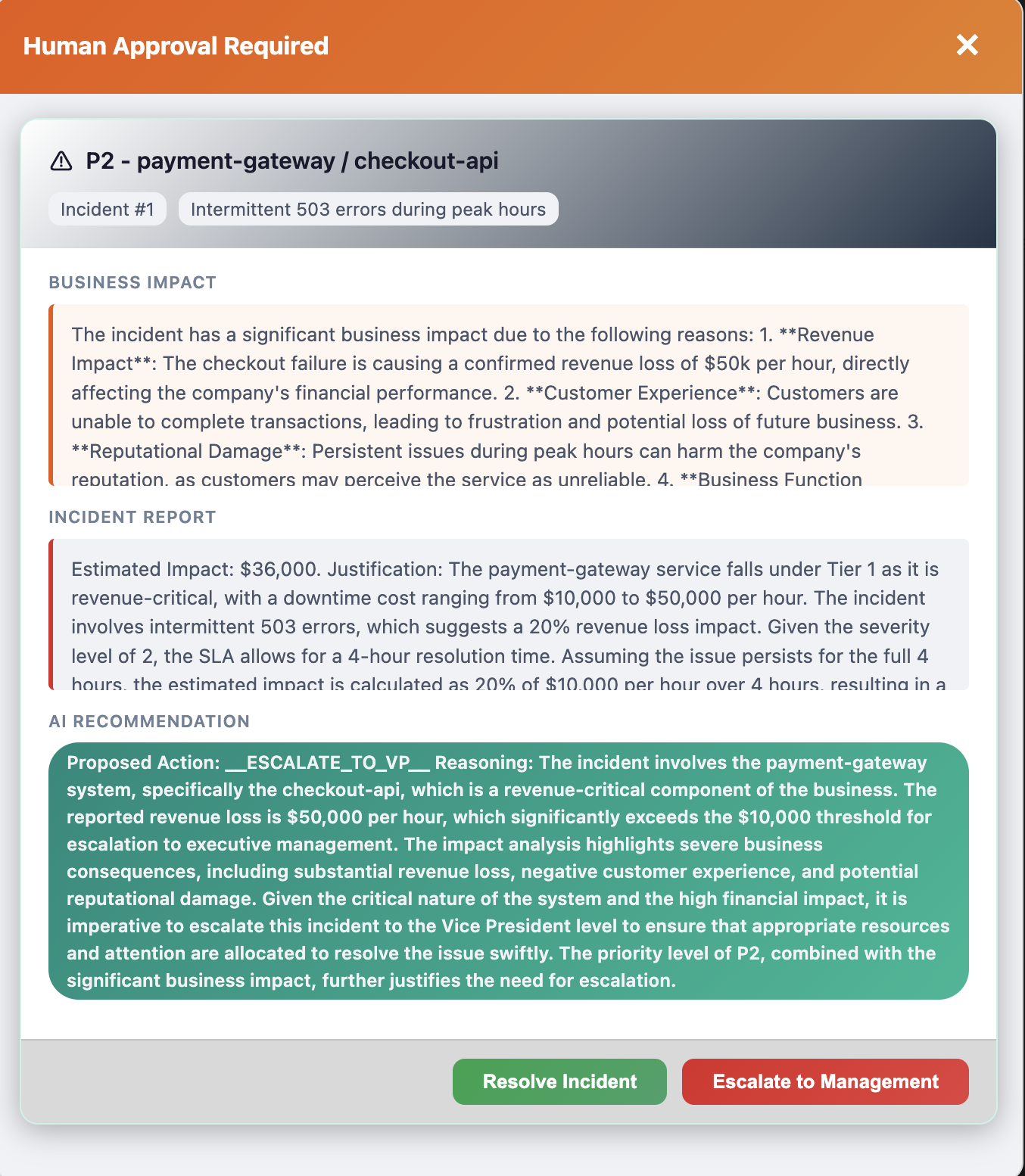
Open http://localhost:8080, click View on Incident #1 (payment-gateway/checkout-api, P2), and process with:
How to confirm: The UI shows an "Awaiting Approval" modal with two buttons. This is the HITL gate — the system has paused and is waiting for a human decision.
- Click Escalate to Management → check that the UI status changes to
ESCALATED - Now press
sin the Quarkus terminal to restart (reset the database), then reload the browser. Process Incident #1 again with the same report → this time click Resolve Incident → check that the UI status changes toRESOLVED
In the Quarkus terminal logs, look for WORKFLOW PAUSED and WORKFLOW RESUMED showing the approval decision.
Step 3 — Read OTel spans in Grafana (4 min)
Grafana not responding?
Pressing s restarts the app and resets the database, but the LGTM container (Grafana + Tempo) stays running — your Step 2 traces are preserved. If http://localhost:3000 is not responding, stop dev mode (Ctrl+C) and restart it — the LGTM container may need a fresh start on first use.
Open http://localhost:3000 and navigate to traces:
- Click the hamburger menu (☰) in the top-left → Explore
- In the data source dropdown (top-left of the Explore panel), select Tempo
- Switch the Query type tab from "TraceQL" to Search
- In the Service Name dropdown, select incident-management
- Click Run query (blue button, top-right) — you should see a list of traces
Service name not in the dropdown?
Tempo registers services only after traces arrive. If you completed Step 2, incident-management should already appear — just refresh the dropdown. If it still doesn't show, go back to http://localhost:8080, process any incident (e.g., Incident #5 with SMTP timeout for 30% of outbound emails), then refresh. Traces can take a few seconds to propagate.
Click any Trace ID link to expand the span waterfall. Look for the POST /incident-management/process/{id} trace — it contains the full agent workflow.
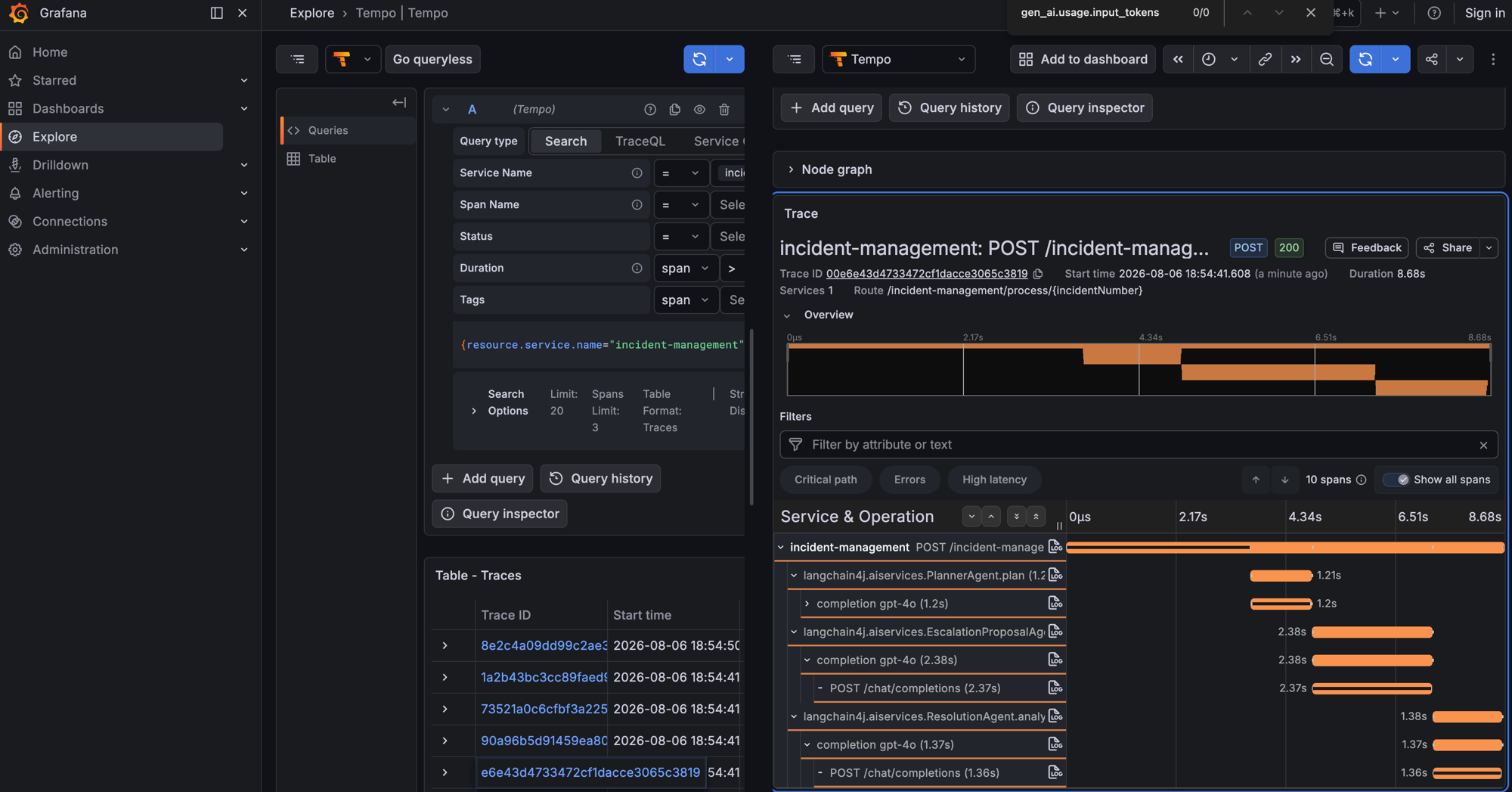
In the span waterfall, look for:
| Span | What it tells you |
|---|---|
IncidentSupervisorAgent |
Supervisor orchestration — which sub-agents it chose |
EscalationProposalAgent |
Time spent generating the escalation proposal |
ResolutionAgent.analyzeForResolution |
Final resolution analysis |
completion gpt-4o |
Individual LLM call inside each agent |
POST /chat/completions |
Raw HTTP request to the model API |
Click any span to expand its attributes — look for gen_ai.usage.input_tokens, gen_ai.usage.output_tokens, and total duration to understand cost and latency per agent.
FinOps thought experiment: 500 incidents/day × avg 1,500 input tokens × gpt-4o pricing = ~$15/day.
An unbounded @UserMessage without AGENTS.md discipline can double input tokens → $30/day.
Tracing is how you catch that before the bill arrives.
Stop the solution (Ctrl+C) and restart lab/:
Done when
- You can explain
@HumanInTheLoopvs regular@Agent— what makes the workflow pause - HITL gate paused and escalated after clicking Escalate to Management → status
ESCALATED - HITL gate paused and resolved after clicking Resolve Incident → status
RESOLVED - Grafana/Tempo shows the span waterfall with agent names (e.g.,
EscalationProposalAgent,completion gpt-4o) and durations - You understand the FinOps insight: tracing reveals per-agent token cost so you can catch runaway spending