Exercise 6 — Human Gate + Tracing
Run + Read
Timebox: 10 minutes
Persona: Alex — Compliance officer
You work in: solutions/06-hitl-observability (run + read)
Solution
The goal
The compliance rule: no autonomous escalation of P1/P2 incidents on revenue-critical systems.
Without a gate, the supervisor you built in Exercise 4 would ESCALATE a P1 payment-gateway outage based purely on LLM reasoning.
With @HumanInTheLoop, the system proposes and pauses — a human approves or rejects. And with OpenTelemetry tracing, every LLM call, tool invocation, and approval decision is auditable.
This exercise introduces two concepts: EscalationProposalAgent (an LLM agent that creates escalation proposals) and @HumanInTheLoop (a gate that pauses the workflow until a human decides).
Why run + read instead of code-along?
Quarkus validates all @Agent parameters at build time against the workflow's AgenticScope output keys. HITL agents depend on outputs from each other (escalationProposal → approvalDecision), so adding a stub to lab/ without wiring the full chain causes IllegalConfigurationException. Plus, HumanApprovalAgent is infrastructure code (CompletableFuture, ApprovalService, timeout handling) — not a 3-minute paste. So you run the working solution and focus on understanding the pattern rather than fighting build errors.
%%{init: {'look':'handDrawn','theme':'base','themeVariables': {'darkMode':false,'background':'#FFFCF5','primaryTextColor':'#1F1F1F','secondaryTextColor':'#1F1F1F','tertiaryTextColor':'#1F1F1F','textColor':'#1F1F1F','lineColor':'#4A4035','edgeLabelBackground':'#FFFCF5','clusterBkg':'#F5F5F0','clusterBorder':'#6B5B45','fontSize':'16px'},'flowchart': {'nodeSpacing':35,'rankSpacing':55,'padding':18}}}%%
flowchart TD
    ISA(["IncidentSupervisorAgent<br/>escalation required"])
    EPA(["EscalationProposalAgent<br/>proposed action ESCALATE_P1"])
    HITL{"HumanInTheLoop gate<br/>Awaiting Approval"}
    ESC([ESCALATED])
    RES([RESOLVED])

    ISA --> EPA --> HITL
    HITL -->|Escalate to Management| ESC
    HITL -->|Resolve Incident| RES

    style ISA fill:#FFE4CC,stroke:#B87333,color:#1F1F1F,stroke-width:2px
    style EPA fill:#D8F0D8,stroke:#3D7A3D,color:#1F1F1F,stroke-width:2px
    style HITL fill:#FFF8DC,stroke:#C4A000,color:#1F1F1F,stroke-width:2px
    style ESC fill:#D8F0D8,stroke:#3D7A3D,color:#1F1F1F,stroke-width:2px
    style RES fill:#D4E6F1,stroke:#2E6B8A,color:#1F1F1F,stroke-width:2px
Step 1 — Start and read the HITL agents (3 min)
Stop your lab/ Quarkus process first (Ctrl+C), then start the solution:
Wait for the LGTM stack:
DevServices for Observability started — Grafana: http://localhost:3000
incident-management started in ~4s
First start may be slow
The LGTM container (Grafana + Loki + Tempo + Mimir) is pulled on first run and can take 1–2 minutes. If http://localhost:3000 isn't reachable, wait for the DevServices for Observability started log line before proceeding. If it doesn't appear, restart dev mode (Ctrl+C then ./mvnw quarkus:dev).
Agentic Dev UI
Open the Agentic Dev UI to see the full agent graph. Notice EscalationProposalAgent and HumanApprovalAgent — the HITL gate shows up as a distinct agent type in the wiring view.
Check the topology — compare it to Exercise 4. The tree now includes the HITL agents.
Open EscalationProposalAgent.java — this is the same @Agent pattern you've been coding, with a @SystemMessage that defines escalation criteria and a @UserMessage template.
Open HumanApprovalAgent.java — this is the HITL gate. Key differences from a regular @Agent:
| Annotation | Purpose |
|---|---|
@HumanInTheLoop |
Human gate — pauses the workflow here |
static method |
Not an LLM call — blocks until human input via CompletableFuture |
Why a separate proposal agent?
EscalationProposalAgent creates a structured proposal — the what and why of the escalation. HumanApprovalAgent is the gate — it pauses the workflow, presents the proposal to a human via the UI, and blocks until they decide. Separating proposal from approval means you can change escalation criteria (edit @SystemMessage) without touching the approval infrastructure.
Step 2 — Test the HITL gate (3 min)
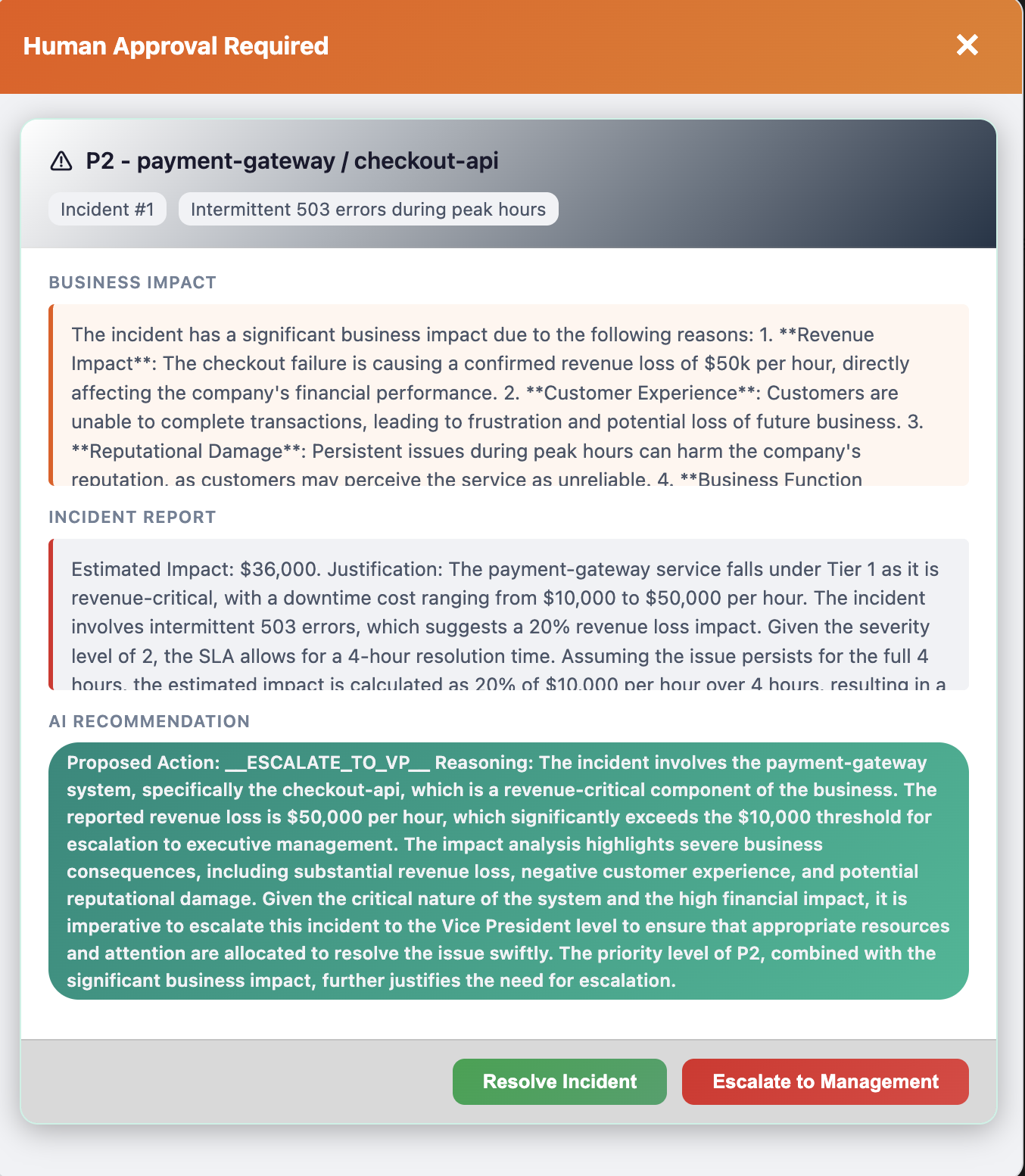
Open http://localhost:8080, click View on Incident #1 (payment-gateway/checkout-api, P2), and process with:
How to confirm: The UI shows an "Awaiting Approval" modal with two buttons. This is the HITL gate — the system has paused and is waiting for a human decision.
- Click Escalate to Management → check that the UI status changes to
ESCALATED - Now press
sin the Quarkus terminal to restart (reset the database), then reload the browser. Process Incident #1 again with the same report → this time click Resolve Incident → check that the UI status changes toRESOLVED
In the Quarkus terminal logs, look for WORKFLOW PAUSED and WORKFLOW RESUMED showing the approval decision.
Step 3 — Read OTel spans in Grafana (4 min)
Grafana not responding?
Pressing s restarts the app and resets the database, but the LGTM container (Grafana + Tempo) stays running — your Step 2 traces are preserved. If http://localhost:3000 is not responding, stop dev mode (Ctrl+C) and restart it — the LGTM container may need a fresh start on first use.
Open http://localhost:3000 and navigate to traces:
- Click the hamburger menu (☰) in the top-left → Explore
- In the data source dropdown (top-left of the Explore panel), select Tempo
- Switch the Query type tab from "TraceQL" to Search
- In the Service Name dropdown, select incident-management
- Click Run query (blue button, top-right) — you should see a list of traces
Service name not in the dropdown?
Tempo registers services only after traces arrive. If you completed Step 2, incident-management should already appear — just refresh the dropdown. If it still doesn't show, go back to http://localhost:8080, process any incident (e.g., Incident #5 with SMTP timeout for 30% of outbound emails), then refresh. Traces can take a few seconds to propagate.
Click any Trace ID link to expand the span waterfall. Look for the POST /incident-management/process/{id} trace — it contains the full agent workflow.
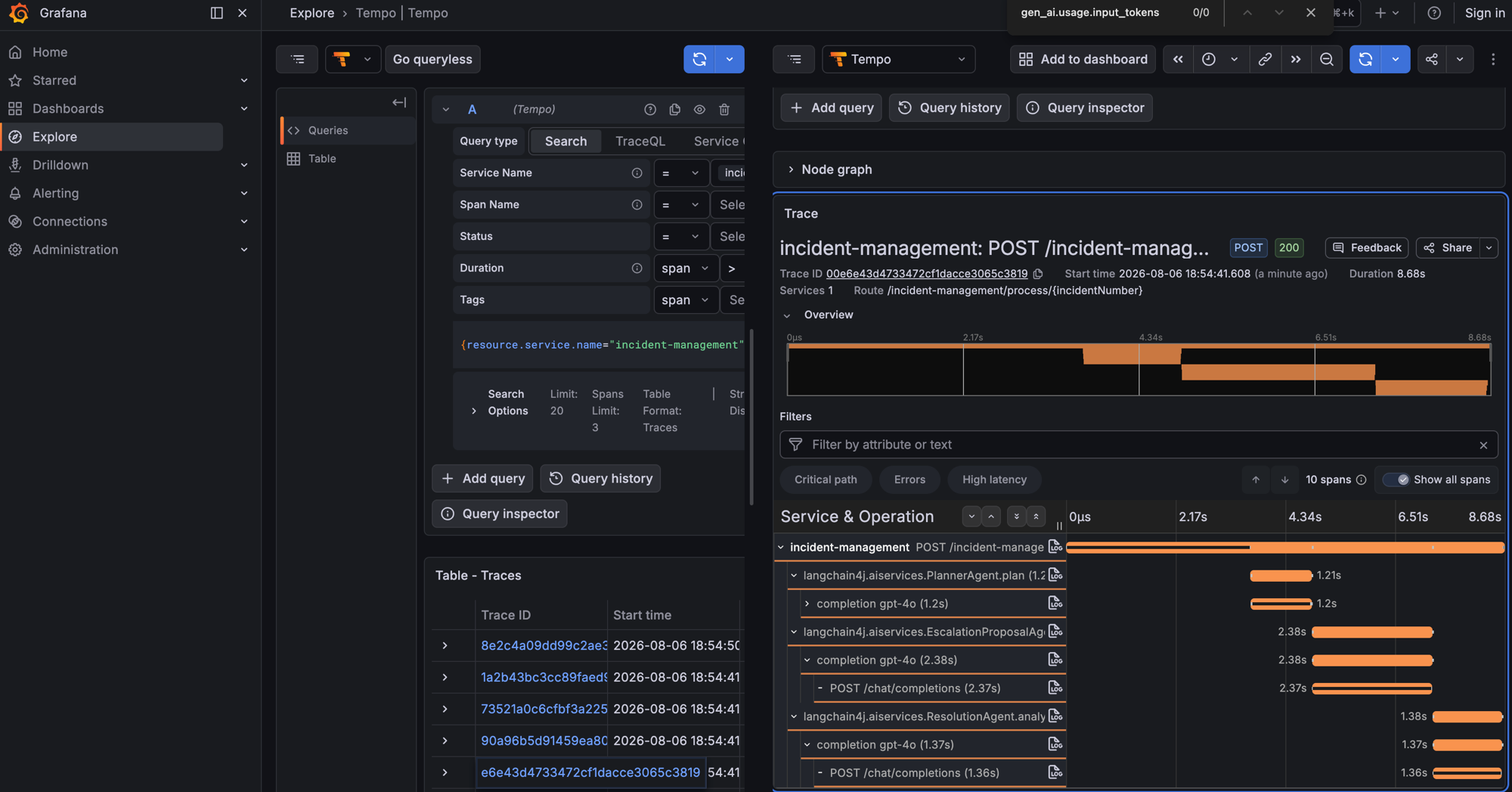
In the span waterfall, look for:
| Span | What it tells you |
|---|---|
IncidentSupervisorAgent |
Supervisor orchestration — which sub-agents it chose |
EscalationProposalAgent |
Time spent generating the escalation proposal |
ResolutionAgent.analyzeForResolution |
Final resolution analysis |
completion gpt-4o |
Individual LLM call inside each agent |
POST /chat/completions |
Raw HTTP request to the model API |
Click any span to expand its attributes — look for gen_ai.usage.input_tokens, gen_ai.usage.output_tokens, and total duration to understand cost and latency per agent.
FinOps thought experiment: 500 incidents/day × avg 1,500 input tokens × gpt-4o pricing = ~$15/day.
An unbounded @UserMessage without AGENTS.md discipline can double input tokens → $30/day.
Tracing is how you catch that before the bill arrives.
Stop the solution (Ctrl+C) and restart lab/:
Done when
- You can explain
@HumanInTheLoopvs regular@Agent— what makes the workflow pause - HITL gate paused and escalated after clicking Escalate to Management → status
ESCALATED - HITL gate paused and resolved after clicking Resolve Incident → status
RESOLVED - Grafana/Tempo shows the span waterfall with agent names (e.g.,
EscalationProposalAgent,completion gpt-4o) and durations - You understand the FinOps insight: tracing reveals per-agent token cost so you can catch runaway spending